Using JumpCloud as an identity provider
You can use JumpCloud as an identity provider to access SC//Reliant™ Platform Manager. To do this, you create a SAML 2.0 Connector on the JumpCloud platform.
Create the JumpCloud SAML 2.0 Connector
The JumpCloud documentation provides the steps for creating a custom SAML 2.0 Connector on their platform. For more information, see SSO using Custom SAML Application Connectors in the JumpCloud documentation.
When configuring your JumpCloud application, you use the Upload Metadata option in their procedure to upload the Service Provider metadata file from SC//Reliant Platform Manager. To retrieve the metadata XML file from the SC//Reliant Platform Manager platform, you should authenticate to SC//Reliant Platform Manager and then navigate to the following URL.
https://platform.reliant.io/saml/metadata.xmlRetrieve the Identity Provider metadata
Once you have your JumpCloud SAML connector created, you need to retrieve the JumpCloud IdP metadata and provide it to your Scale Computing Account Manager to complete the setup.
- In the JumpCloud Admin console, access the settings for the SC//Reliant Platform Manager application you created.
- On the SSO tab, locate the JumpCloud Metadata section.
- Choose Export Metadata.
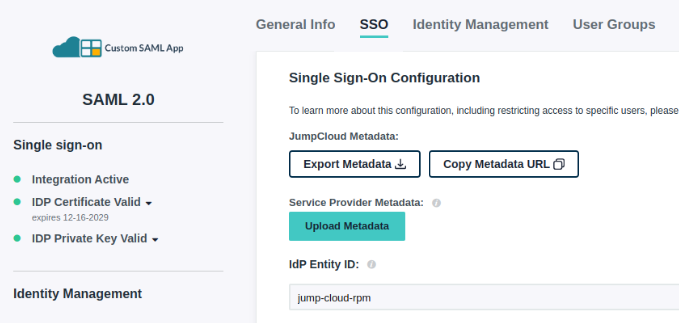
- Copy that metadata and provide it to your Scale Computing Account Manager. This metadata is then associated with your SC//Reliant Platform Manager tenant by our engineering team.
IMPORTANT: Ensure that the user's email in JumpCloud matches the user's SC//Reliant Platform Manager account email address. It must be in all lowercase, otherwise an error will be received when logging in to SC//Reliant Platform Manager.