Using data volumes
The SC//Reliant™ platform supports data volumes for Docker containers hosted on the platform. These volumes can be shared across multiple containers or be exclusive to a single container. They can also be configured to persist beyond the lifecycle of the container or be treated as ephemeral volumes.
When a volume is configured in SC//Reliant Platform Manager and Puppet is run, a volume is created on the host in the /docker directory. The format of the path of the volume is /docker/<container_name>-<volumename>. The following topics dive deeper into the concepts related to data volumes for containers.
Shared vs Exclusive Volumes
The SC//Reliant platform supports both shared volumes and exclusive volumes for containers. The following describes the differences between them and how they are defined in SC//Reliant Platform Manager.
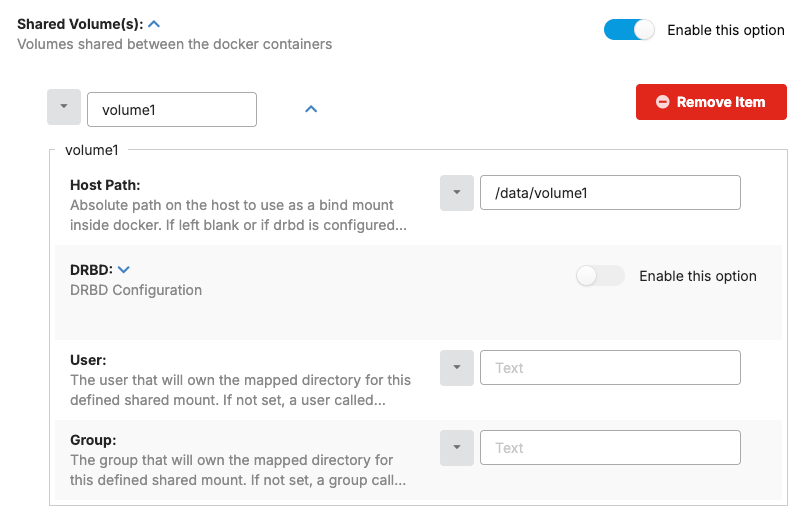
A shared volume is a Docker volume that is mounted and accessed by multiple containers. They are defined in the Shared Volumes hash in the Cluster Docker Resources or Docker hashes in SC//Reliant Platform Manager. Once a shared volume is defined, the volume name can be referenced in the Shared Volumes hash inside of the Containers hash for each container that needs to access the shared volume. The name of the shared volume in the Containers hash must match the name of a shared volume. A shared volume that contains a DRBD configuration is not removed from a host when either the shared volume configuration or any container accessing the volume is removed from SC//Reliant Platform Manager.
The following is the Shared Volumes hash in SC//Reliant Platform Manager.
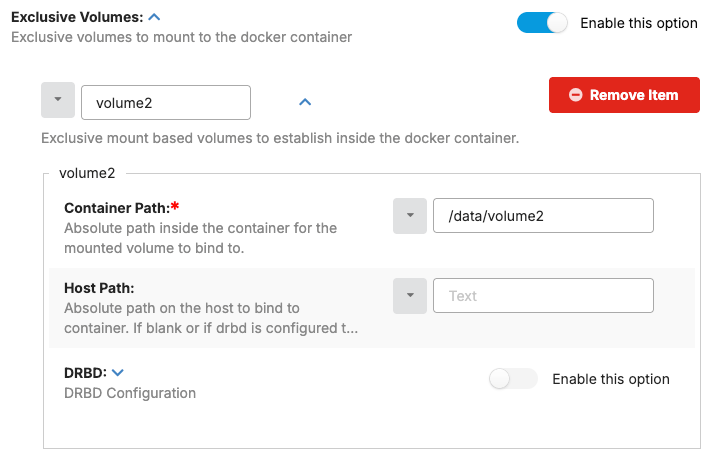
An exclusive volume is a Docker volume that is mounted and is intended to be used by a single container. They are defined in the Containers hash for each container that requires an exclusive volume. An exclusive volume that contains a DRBD configuration is removed from a host when the exclusive volume configuration is removed from SC//Reliant Platform Manager.
The following is the Exclusive Volumes hash in SC//Reliant Platform Manager.
Persistent vs Ephemeral Volumes
The SC//Reliant platform uses the DRBD (Distributed Replicated Block Device) open-source software to replicate your data volumes. DRBD operates at the block device level in the Linux kernel. It creates a mirrored block device across the nodes in a cluster. When integrated with Docker in a clustered environment, DRBD provides a mechanism for ensuring the data volume persists beyond the lifecycle of a container. How this works is that in the event of a node failure, the DRBD resource on the remaining node can be promoted to the primary role. Since the filesystem is already mounted on this node, and it contains the replicated data, the Docker containers can be started on this node and immediately access the persistent data volume.
Any data volumes that haven't been configured for DRBD, or any volume for singleton containers outside the cluster, are considered ephemeral.
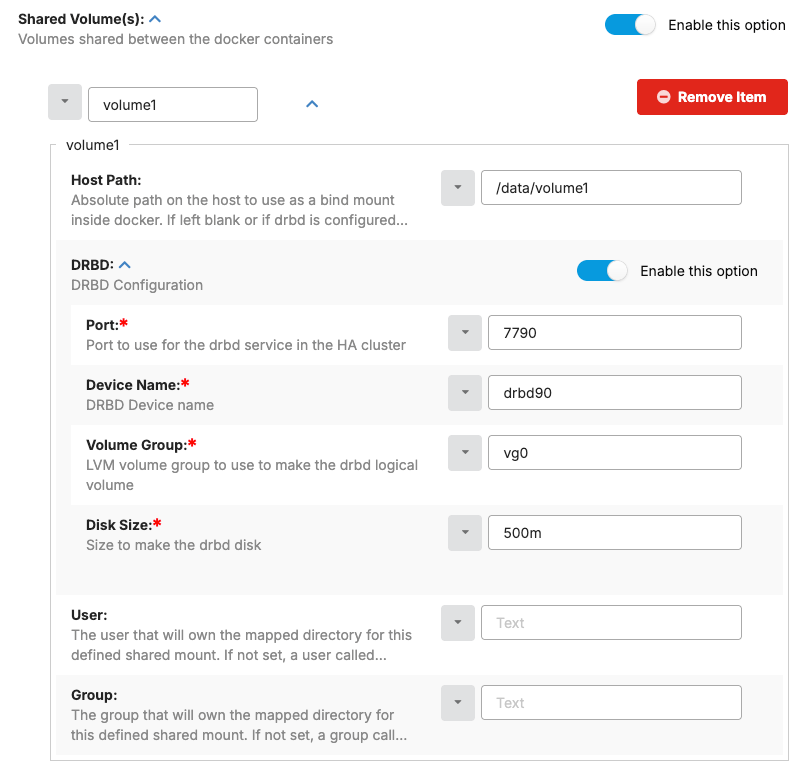
When you specify a DRBD configuration for a volume, you must specify the following values.
- Port - The TCP network port that DRBD uses to facilitate replication and synchronization between the nodes in the cluster.
- Device Name - The virtual block device name that DRBD creates and manages on each node in the cluster. This device acts as the replicated storage. The
Device Namevalue must be unique. We recommend using sequential values likedrbd90,drbd91, etc. Keep in mind that if you are also hosting KVM virtual machines that are configured for DRBD replication that the device names must also be unique across both technologies. - Volume Group - The Logical Volume Management (LVM) volume group that DRBD utilizes as the underlying storage for replication.
- Disk Size - The size of the DRBD managed block device. You should ensure that the hard drive on each host node has enough space for the sum of all of the DRBD virtual block devices you define in SC//Reliant Platform Manager.
The following is the DRBD configuration for a volume in SC//Reliant Platform Manager.
If you want to update the DRBD configuration for a volume that has already been deployed, you must remove the volume first and then re-add it with your desired configuration. For exclusive volumes, you can simply remove the volume in SC//Reliant Platform Manager and then run Puppet. For shared volumes, there are manual steps you must follow.
On each node, you can use the following command to see an overview of the DRBD block devices.
cat /proc/drbdOn nodes whose DRBD utilities are version 9.x, sudo drbdadm status lists the same devices by resource name, which for a container volume takes the form docker-shared-<volumename> or docker-container-<container_name>-<volumename>. Older material uses sudo drbd-overview, which was long deprecated and was removed in drbd-utils 9.6.0. For more information, see DRBD replication status reference.
Controlling container access to the volume
When either a shared or exclusive volume is configured in SC//Reliant Platform Manager and Puppet is run, a volume is created on the host in the /docker directory. The format of the path of the volume is /docker/<container_name>-<volumename>. The container path you specify in SC//Reliant Platform Manager determines not only where the volume is bind mounted in the container but also whether the container has read and write or read-only access to the volume. By default, containers are granted read and write access to the volume.
To restrict access for the container to read-only permissions, simply add a :ro suffix to the container path in SC//Reliant Platform Manager, for example, a volume bind mounted to /data will have read/write permissions but a volume bind mounted to /data:ro will have read-only permissions.
Docker resources hash properties reference
The properties that define volumes, and the fields a container uses to mount them, are described in Data volumes and Containers hash reference on the Managing SC//Reliant Platform Manager data for containers page.