This page explains how SC//HyperCore™ HyperVisor stores data: the SCRIBE storage engine, the hypervisor that runs alongside it, HEAT tiering, thin provisioning and data deduplication.
Overview
The SC//HyperCore virtualization system is built on its own storage engine, SCRIBE: the Scale Computing Reliable Independent Block Engine. To understand how the SC//HyperCore platform handles storage capacity, thin provisioning, VM snapshots, VM cloning, and data deduplication, you first need to know how SCRIBE works.
This page covers the core architecture. To see how these ideas affect snapshots and clones in practice, see SC//HyperCore Snapshots. For help reading storage capacity in the web interface, see Capacity and Resource Management.
Software-Defined Storage: SCRIBE
SCRIBE is not a repurposed file system. It is an enterprise-class, clustered block storage layer, built for the KVM-based SC//HyperCore hypervisor to use directly.
SCRIBE finds all block storage devices across the system. These include flash-based solid state disks (SSDs) and standard spinning disks (SATA or SAS HDDs). SCRIBE then pools them across all nodes into Real SCRIBE Devices (RSDs). RSDs represent the physical storage hardware in the system: the actual hard drives in each node.
Any node in the system can read and write data as soon as it lands in the SSD or HDD storage pool. This makes data redundancy, deduplication, load balancing, and tiered I/O prioritization possible across the cluster.
Wide striping spreads I/O load across all nodes. The result is performance well beyond that of solutions with similar storage resources and cost.
What Makes SCRIBE Different
Unlike other converged architectures, SCRIBE does not run inside a virtual machine as a VSA or controller VM. It runs parallel to the hypervisor, so direct data flows get the speed of zero-copy shared memory. This is one of the key traits that makes the SC//HyperCore platform a true hyperconverged system, not a loosely integrated one.
Software-Defined Computing: The SC//HyperCore Hypervisor
The SC//HyperCore software layer is a lightweight hypervisor built directly into the OS kernel. It is based on parts of the KVM hypervisor, which is widely proven in large-scale environments.
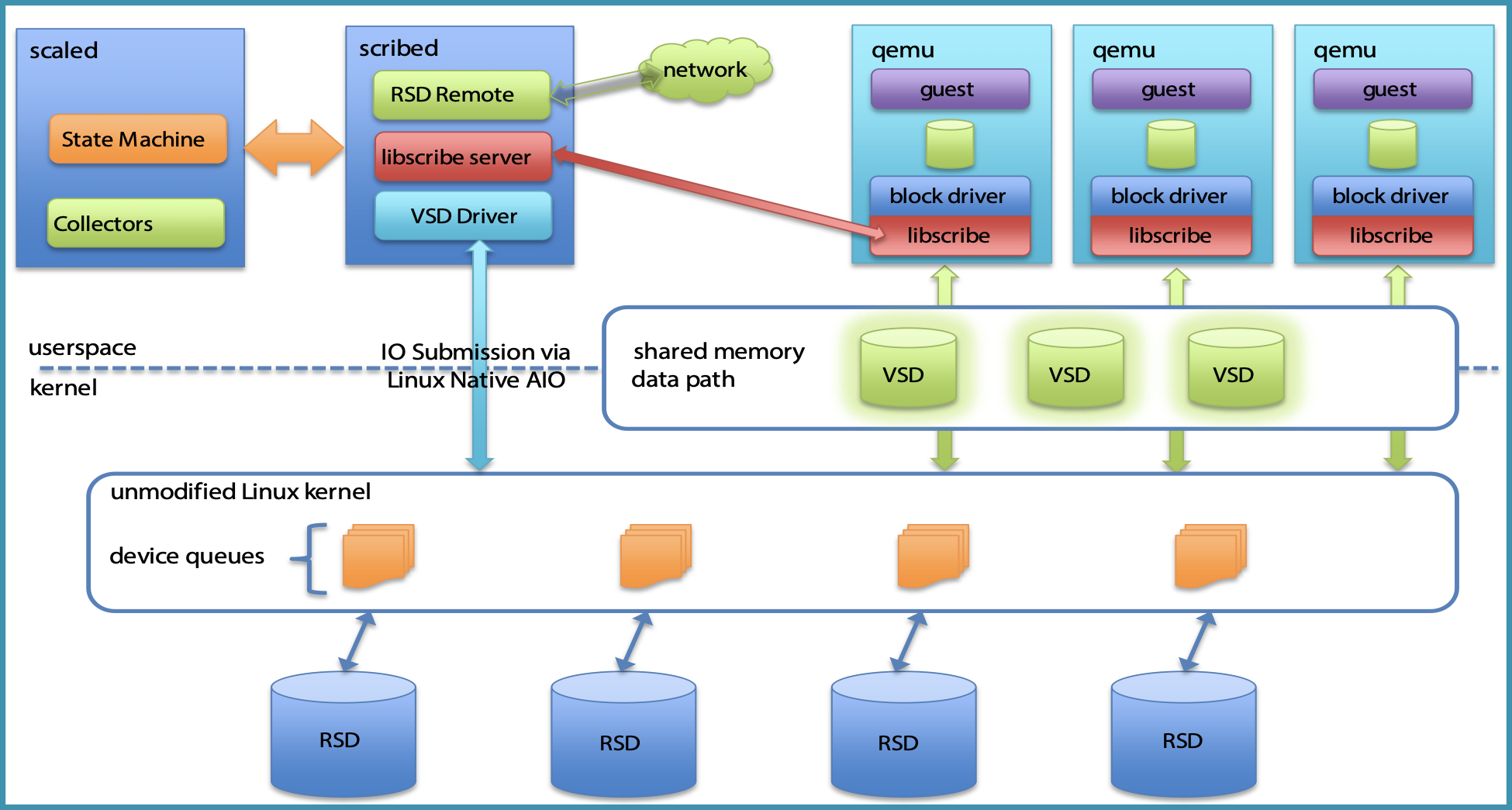
The SC//HyperCore virtualization suite builds the SCRIBE storage pool directly into the KVM hypervisor. VMs on an SC//HyperCore node have direct, block-level access to Virtual SCRIBE Devices (VSDs) in the shared storage pool. VSDs are the VM virtual disks. This direct access removes the complexity and performance overhead of remote storage protocols.
Key Components
- RSD (Real SCRIBE Device): Any physical storage hardware in the system. These are the physical hard drives in each node, whether SSDs or HDDs.
- VSD (Virtual SCRIBE Device): A VM virtual disk in the SCRIBE storage pool.
- scaled: The state machine that watches the whole system in real time for issues and provides self-healing intelligence.
- qemu: Pronounced “key-moo.” The SC//HyperCore virtual machine component, which works as part of the KVM architecture.
The diagram below shows how SCRIBE and the SC//HyperCore hypervisor work together across these components.
HEAT: SC//HyperCore Enhanced Automated Tiering
HEAT extends the base SCRIBE storage layer. It places data on the SSD and HDD tiers within SC//HyperCore system nodes. To do this, it keeps a real-time heat map of virtual disk data, and it uses algorithms to move hot and cold data blocks between tiers.
Administrators can control SSD tier access for each VM virtual disk. All VM virtual disks can use the SSD tier, no matter which node the VM runs on.
On systems with tiered SC//HyperCore nodes, each VM has its own HEAT information. This includes cloned VMs, even when they share block reference counts with a parent. HEAT treats a cloned VM as a new VM and gives it the default priority of 4 within the system tiers.
Thin Provisioning and Block Reference Counts
SCRIBE’s block engine design makes thin provisioning simple to put in place. Thin provisioning also underlies nearly everything else SCRIBE does: snapshots, cloning, and deduplication all depend on it.
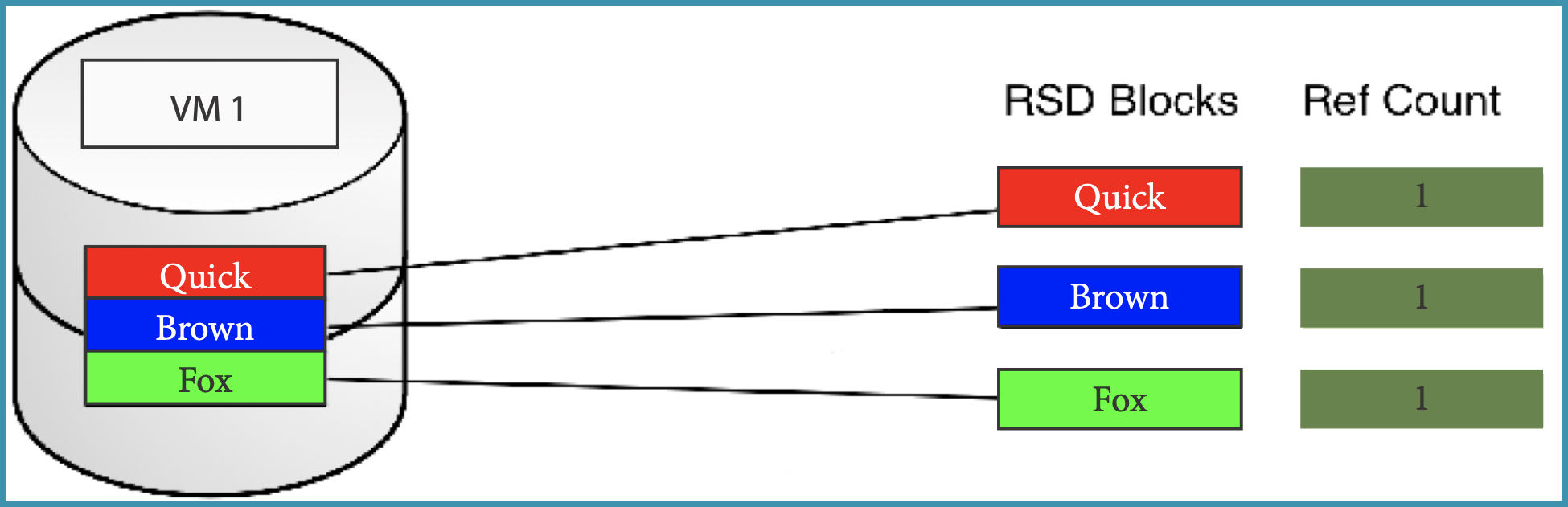
When SCRIBE gets an I/O request, the system accesses, assesses, and updates virtual disk metadata for the affected data block. SCRIBE uses reference counts, a data structure that tracks how many times each block within a VM virtual disk is referenced. SCRIBE increments the reference counts for all blocks that are part of a given VM, VM clone, or snapshot.
For a brand new VM that has not been cloned or restored from a snapshot, reference counts are always 1. The diagram below shows this.
When you snapshot or clone a VM, SCRIBE increments the reference counts for all shared blocks. Then multiple VSDs can share the same physical blocks on the RSDs, which keeps storage use low until those blocks actually diverge.
SCRIBE releases a block back to the system’s free storage pool only when its reference count reaches 0. So deleting a snapshot or a VM does not always free as much space as you might expect. If other VSDs still reference its blocks, their count just decrements without reaching 0.
Reference counting keeps unique blocks for the life of the VM or snapshot. It also lets SCRIBE write new blocks as needed, with only a small metadata overhead to track the counts.
On active systems, reference counts can reach the thousands or even higher. So there is no easy way to work out exactly how much space deleting a specific VM or snapshot will free. The Storage Details dialog gives the best available estimate. See Capacity and Resource Management for details.
Data Deduplication
SC//HyperCore data deduplication runs as a post-process. It works with existing background processes to find duplicate 1 MiB blocks of data on a given physical disk.
Deduplication uses the existing reference count mechanism. When it finds that independently written blocks are identical, it updates their reference count to point to a single copy. Then it releases the duplicate block back to the free storage pool.
How the Process Works
The deduplication process builds a hash index of each block on each node, and it stores the hash in node RAM. A separate background process frees duplicate blocks when system use is low. It puts running workloads ahead of deduplication tasks.
The hashing algorithm scans at roughly 1 TB of data per day, per node, depending on the mix of SSD and HDD disks.
Deduplication works per physical disk on a given node, not system-wide. This keeps its footprint small while still giving the full benefits of deduplication.
RAM Requirements
Storing the hash index in RAM means:
- Any node restart, whether from power, an upgrade, or another interruption, loses the hash indexes. They come back when the background disk scan rebuilds them.
- Each node needs a small amount of extra RAM: 32 MiB of RAM for every 1 TiB of physical disk space, per node.
If you have sizing questions about this requirement, contact your Scale Computing Sales Engineer.
Viewing Deduplication Savings
To see the space that deduplication saves, check the Physical graph of the Efficiency view in the Storage Details dialog. See Capacity and Resource Management for details.