SC//HyperCore™ HyperVisor software supports near-instantaneous VM snapshots and VM cloning, made possible by the SCRIBE block storage engine and the SC//HyperCore hypervisor working together. Understanding how both features work at the block level helps explain behaviors that might otherwise seem counterintuitive — particularly why deleting a snapshot or a parent VM doesn’t always free the amount of space you’d expect.
VM Snapshots
What a Snapshot Captures
A VM snapshot captures the entire VM disk contents and configuration at an exact point in time: allocated memory, vCPUs, virtual disks, virtual NICs, and so on. VM RAM state is not included — only the point-in-time virtual disk state.
Snapshots can be taken while a VM is powered on or powered off. Any in-flight I/O to the virtual disk is briefly quiesced at the moment the snapshot is taken, but in a way that causes no disruption to the VM.
Snapshot Types
- Manual snapshots are taken by the user and are never removed by the system automatically. Only the user can delete them.
- Automatic snapshots are generated by the system for SC//HyperCore replication, using either the system default schedule or a custom schedule assigned to the VM. Past automated snapshots are removed by replication as new ones are taken.
Snapshot Limits and Longevity
Up to 5,000 snapshots can be stored per VM. The practical limitation on a snapshot’s longevity is the system’s capacity to store the snapshot changes. Snapshots are allocate-on-write: they grow with each subsequent change made to the VM from the time the snapshot was taken, but reuse existing data copies for thin provisioning where possible.
Snapshots are also assessed as part of the SCRIBE data deduplication feature.
Using Snapshots for Restore
Restoring from a VM snapshot is functionally the same as cloning that snapshot image. A VM cloned from a snapshot and powered on will start as if the VM had rebooted — similar to a physical machine that had its power cut. Snapshots are always point-in-time consistent.
Snapshots cannot be manually moved out of the SC//HyperCore environment. They are tied to specific VMs and their data structures on the system. However, they are used by the native SC//HyperCore replication feature for disaster recovery.
How Snapshots Use Storage: Block Reference Counts
When a snapshot is taken, the VM is copied exactly as it exists at that point in time — including its RSD blocks. Because those blocks are now shared between two entities (the VM and the snapshot), the reference count for each shared block is incremented by one.
This is illustrated below, where Snapshot 0 is taken for VM 1. Snapshot 0 shares the “Quick,” “Brown,” and “Fox” blocks with VM 1 at the time the snapshot is taken.
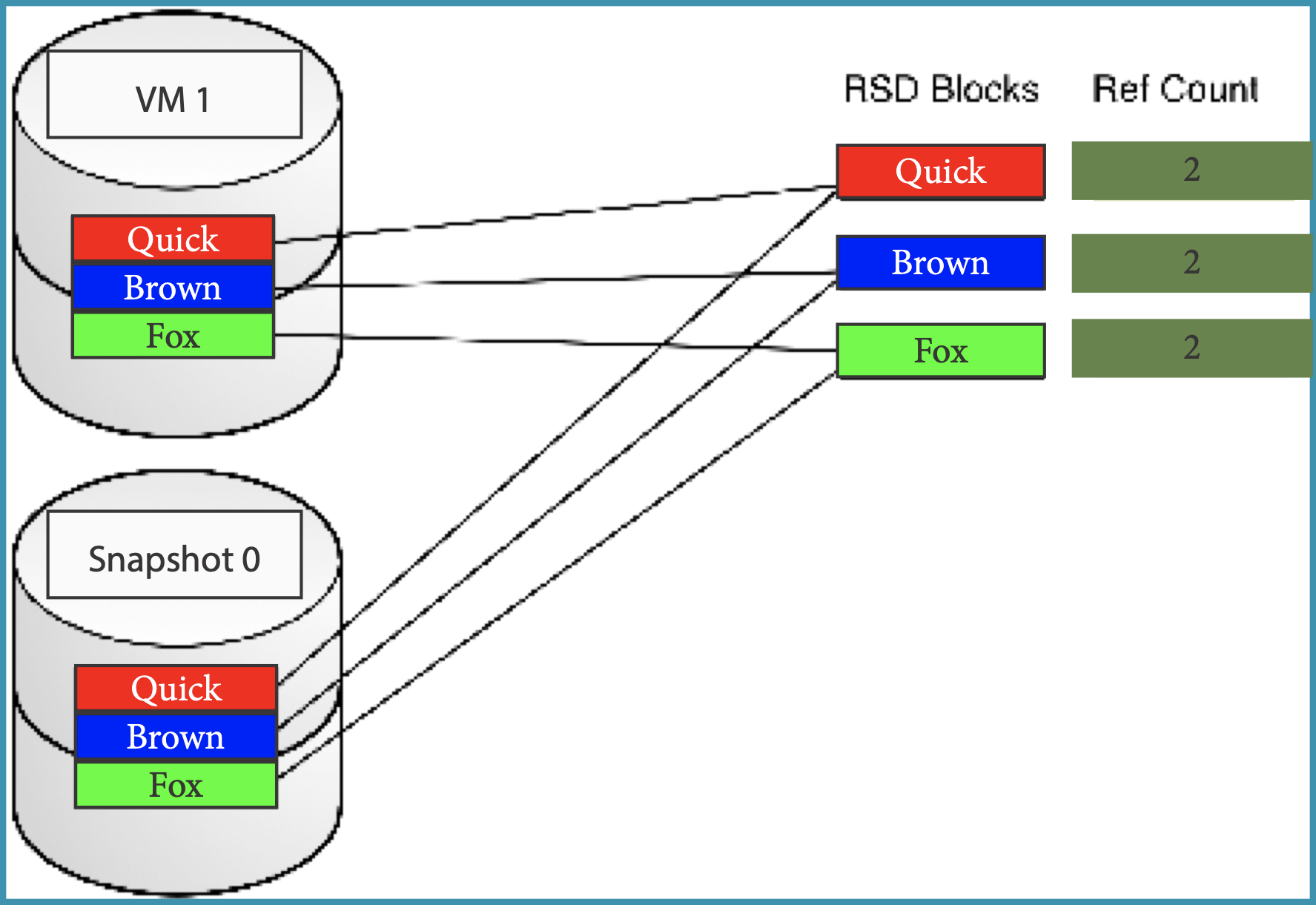
Taking a snapshot does not consume additional storage capacity at the moment it is taken — it only creates a copy of the existing block metadata.
Snapshots begin consuming their own space when their blocks become unique to them alone. In the next diagram, VM 1 overwrites the “Fox” block with a new “Dog” block, so VM 1 no longer references “Fox” — but Snapshot 0 still does. “Fox” is now unique to the snapshot.
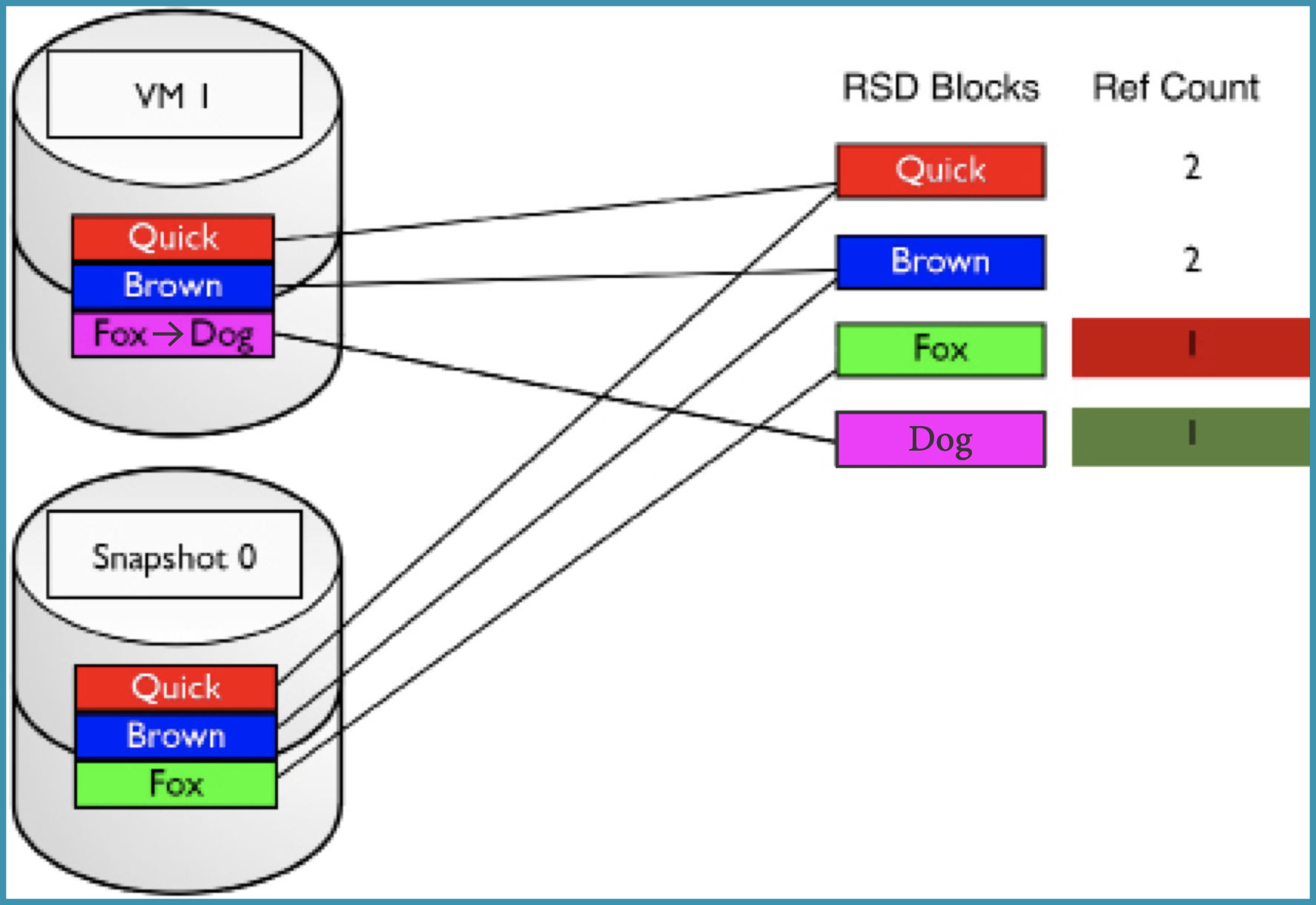
Over time, more and more blocks become unique to older snapshots, which is why the Diff Size reported for a snapshot tends to grow from when it was initially taken.
Understanding Diff Size
The Diff Size shown in the Snapshots popup dialog does not indicate the total size of a snapshot. It indicates the current blocks of that snapshot that are different from the immediately previous snapshot.
The oldest VM snapshot’s Diff Size can be used to determine the combined allocated size of a VM’s drives (there must be at least one snapshot — automated or manual — to see this). The allocated size is the actual space a VM consumes on the system, which may be significantly less than the total provisioned size of its virtual disks. For example, a VM with two 100 GB drives may only be consuming 60 GB on one and 30 GB on the other — a total allocated space of 90 GB, which would be reported as the Diff Size of the oldest snapshot.
Why Deleting a Snapshot May Not Free Much Space
When a snapshot is deleted, only the blocks whose reference count drops to 0 are released back to the free storage pool. Blocks still referenced by other VSDs (other snapshots, the parent VM, or cloned VMs) simply have their count decremented — they are not freed.
The following diagram shows this: when Snapshot 0 is deleted, the “Fox” block reaches a reference count of 0 and is released. The “Quick” and “Brown” blocks are still referenced by VM 1, so they are not freed.
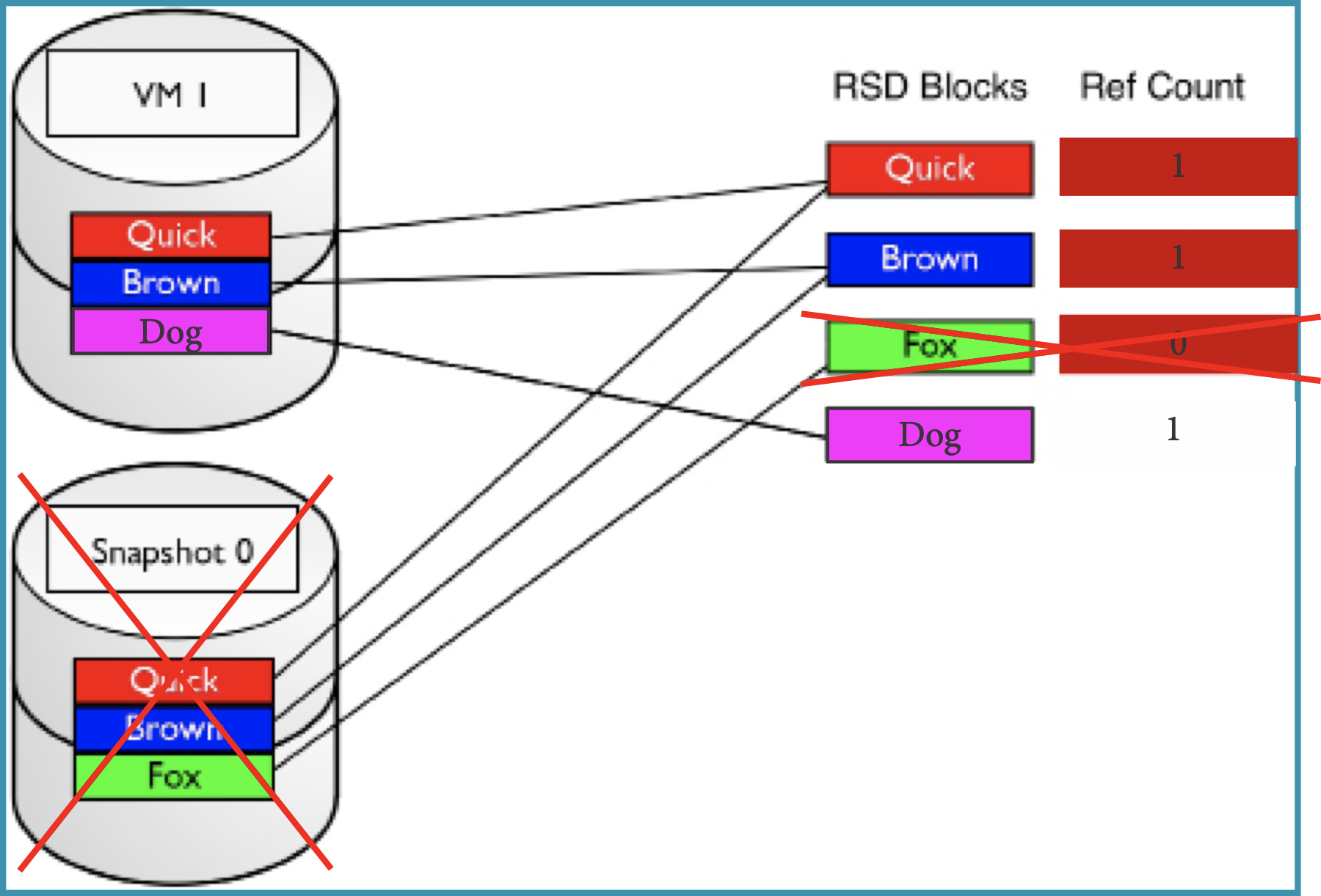
In practice, a snapshot that appears to hold GBs or TBs of data may only free a fraction of that amount when deleted. Subsequent snapshots on the same VM, or clones of the VM, will likely still hold many of the same blocks.
As a general rule: older snapshots tend to hold more unique blocks and are more likely to free meaningful space when deleted. Snapshots on frequently-changing VMs — such as databases — are also more likely to hold unique blocks.
VM Clones
What Cloning Produces
Cloning creates an exact replica of a VM, including its IP information, memory, OS, and vCPU configuration. By default, cloning changes the MAC address of virtual NICs.
If you have applications that depend on a fixed MAC address, you can choose to keep the original address or manually edit it before booting the clone. One approach is to record the required MAC address in the VM description for easy reference in backup and DR scenarios.
A VM can be cloned while powered on or powered off. Cloning a powered-on VM produces a “crash-consistent” state — similar to a physical machine that had its power cut. Once created, the clone is completely independent of the parent VM; deleting the parent does not affect clone operations.
How Clones Differ from Snapshots
Snapshots are a part of their parent VM. Clones are independent entities from the moment they are created. Both share blocks with their origin at creation time using the same reference count mechanism, but a clone begins diverging from its parent as soon as operations are performed on either VM.
How Clones Use Storage: Block Reference Counts
When a VM is cloned, all of the parent VM’s RSD blocks are shared with the clone, and their reference counts are incremented. At the moment of creation, the clone consumes no additional storage beyond its metadata.
The diagram below shows Clone VM immediately after being created from Parent VM. They share “Quick,” “Brown,” and “Fox” blocks, each with a reference count of 2.
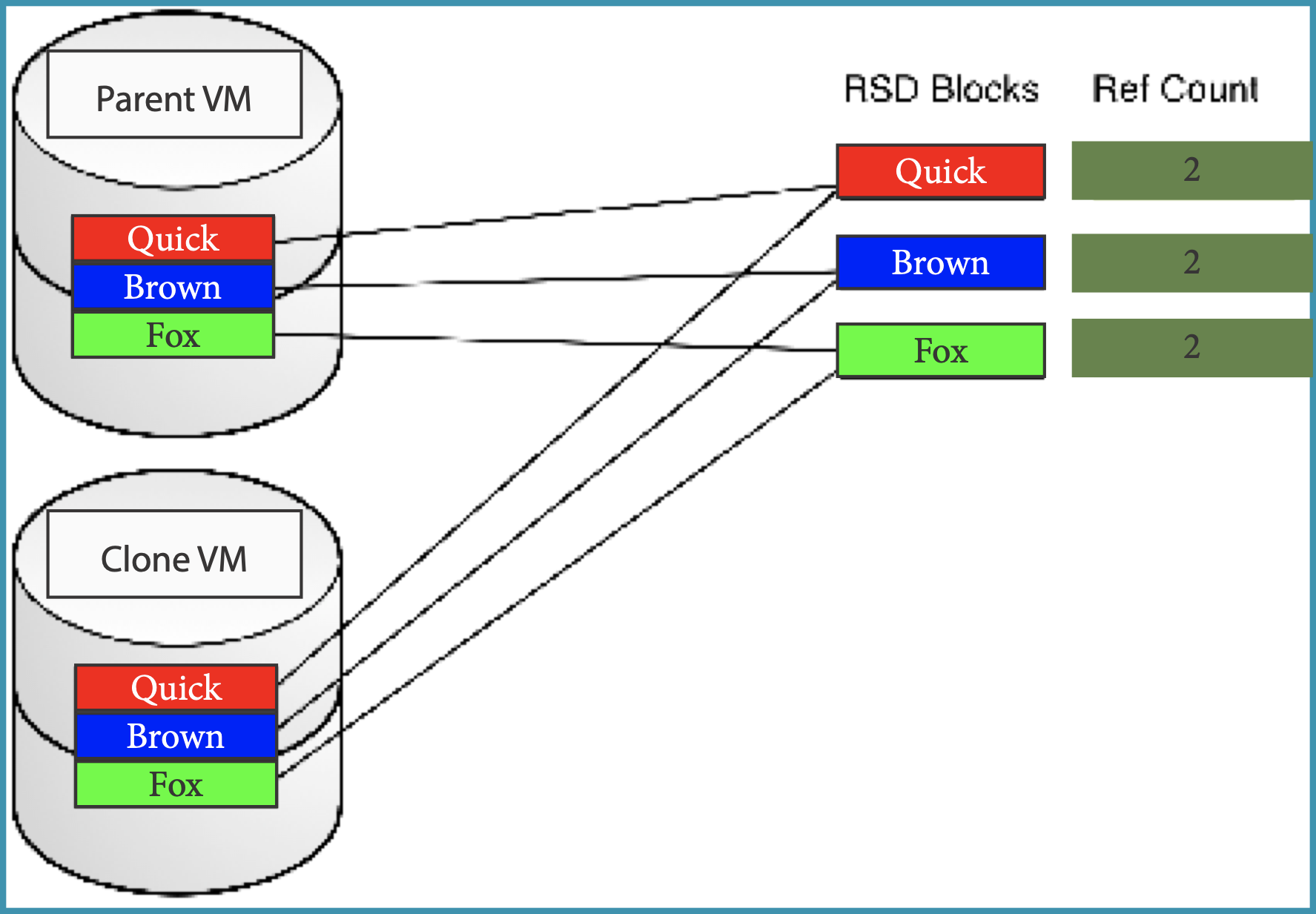
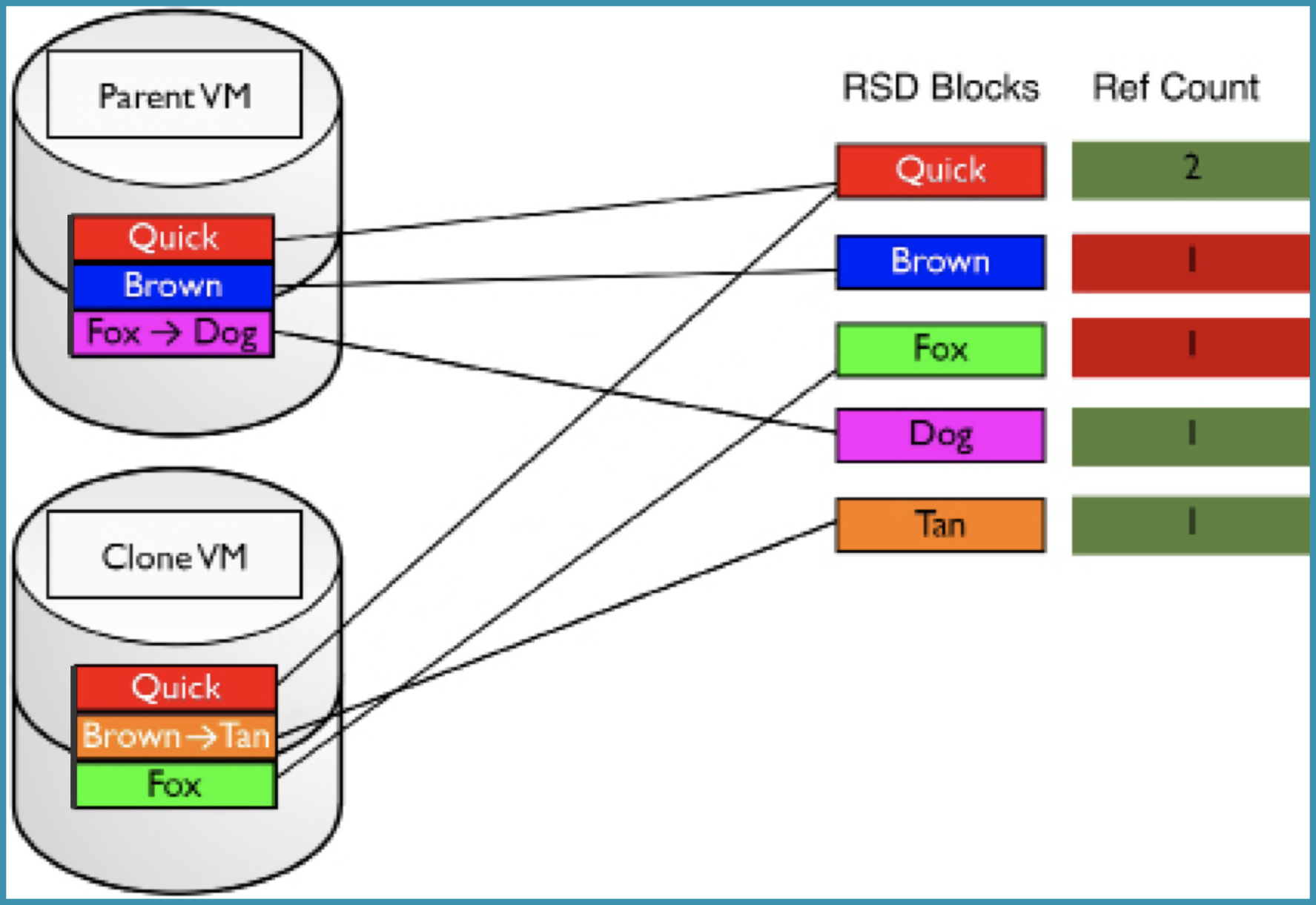
As both VMs run independently, they write new blocks and diverge from their shared origin. Next, Parent VM changes “Fox” to “Dog” and Clone VM changes “Brown” to “Tan” — both are now consuming unique capacity for those blocks, while still sharing “Quick.”
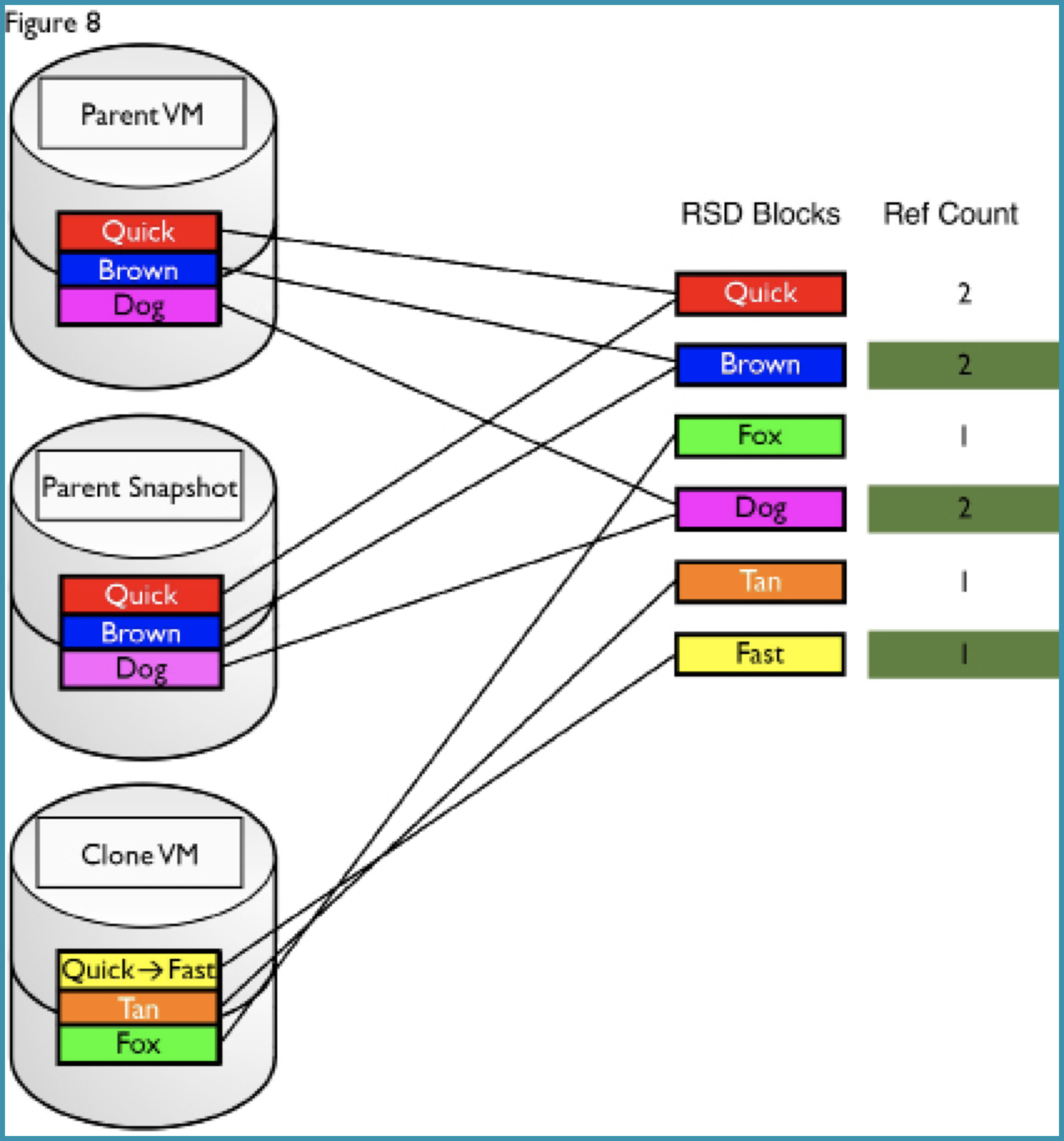
Next, a snapshot has been taken of Parent VM (locking in its changes), and Clone VM has made an additional change, replacing “Quick” with “Fast.” The two VMs now share no blocks.
What Happens When the Parent VM Is Deleted
If the parent VM is deleted, only the blocks with a reference count that drops to 0 are freed. If the clone has already diverged completely from the parent, deleting the parent frees all of the parent’s allocated space — the clone is unaffected.
The following diagram shows this scenario: after deleting Parent VM and its snapshot, Clone VM’s reference counts are unchanged because it no longer shares any blocks with the parent.
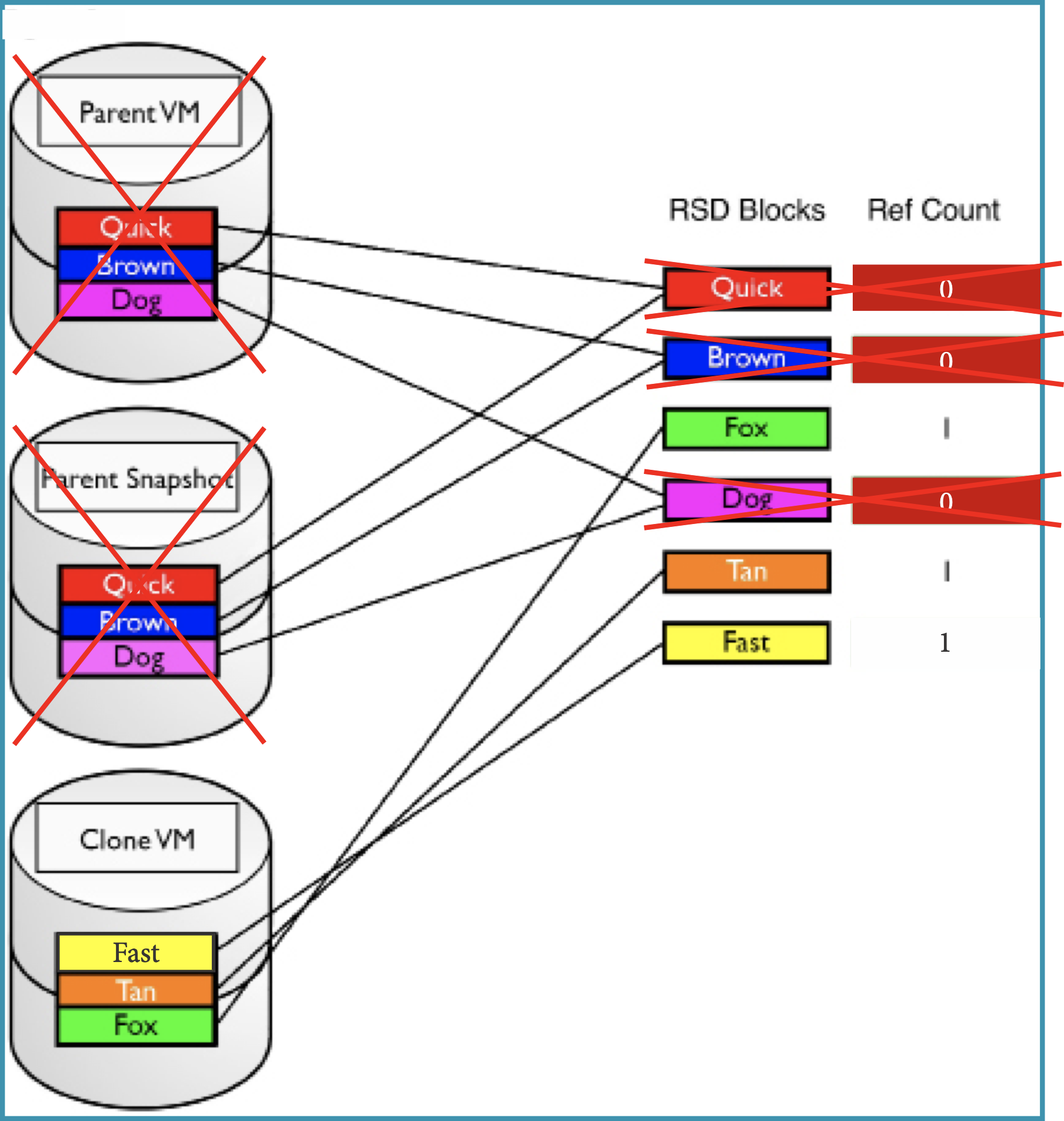
If the clone still shares blocks with the parent at the time of deletion, those shared blocks will not be freed — their reference count simply decrements. The clone effectively “takes over” ownership of those blocks.
A Real-World Example
Consider a parent VM with three virtual drives, each 500 GB, all fully allocated. If the clone has completely diverged from the parent by the time it is deleted, the full 1.5 TB is freed. If one of the three VSDs is still shared with the clone, only 1 TB is freed — the 500 GB still referenced by the clone remains in use.
Capacity Implications: What to Keep in Mind
- Snapshots and clones are both thin-provisioned at creation and begin consuming additional capacity as their blocks diverge from the source.
- Deleting a snapshot or parent VM will not necessarily free as much space as expected. How much space is freed depends entirely on whether any remaining VSDs still reference the same blocks.
- On an active system, reference counts can reach the thousands, hundreds of thousands, or more. There is no reliable way to calculate in advance exactly how much space a deletion will free.
- The Storage Details dialog in the SC//HyperCore web interface provides the best available view of overall system capacity. See Capacity and Resource Management for a full walkthrough.