Upgrade using ELFIQ Central
If you have a valid LinkCare maintenance plan, you can use ELFIQ Central to upgrade the firmware on your device. Use the following procedure to perform or to schedule a firmware update on one or more units. If your deployment is configured for high availability (HA), contact support for help with the upgrade process.

|
|
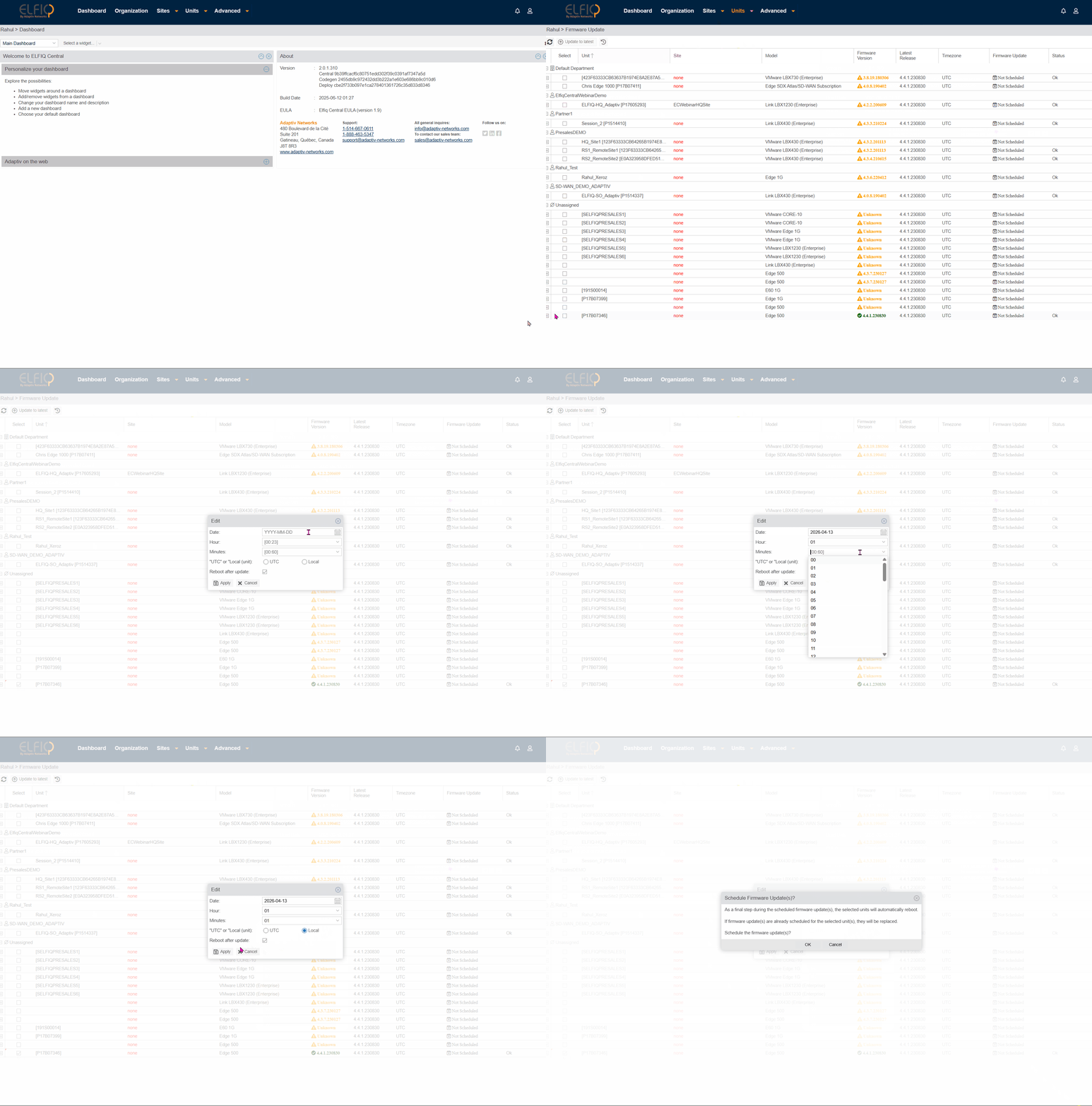
- Select Unit > Firmware Update.
- Click the checkbox in the Select column to choose the devices to upgrade.
- Click the Update to latest button on the upper left side of the screen.
- Set the date and time for the upgrade. Choose one of the following options:
- UTC (Coordinated Universal Time)—Select this option to update all units at the same time.
- Local Time—Select this option if you want to specify a time to update the units that is based on the time zone where the unit is located.
- Follow prompts to reboot the unit.
- Click Apply and then click OK.
TERMS OF USE | ANTI SPAM | PRIVACY POLICY | USER LICENSE AGREEMENT | PATENTS
Copyright © 2026 Adaptiv Networks, Inc. Send Feedback