Service Severity
In the orchestrator, the site, customer, and partner dashboards present information about service severity. The site dashboard also includes information about the service severity of each WAN link, including wireless, connected to the Edge device. The link severity is determined on the current status of the link (up or down) and the MOS value. The site service severity is derived from the aggregation of service severity of the WAN links configured on the Edge device. There are four levels of severity: no issues, low, medium, and high.

|
The service severity does not apply to My Connect licenses. The customer dashboard with only My Connect licenses is always represented as No Issues. If a customer has no sites and only My Connect licenses, the service severity will always be No Issues. However, if a customer has sites as well as My Connect licenses, the service severity of the sites will take precedence over My Connect licenses. |
The following sections explain how service severity is determined and represented at each level.
Site Dashboard
The site dashboard presents the data for link severity and site severity. The link severity is determined by the status of the link (up or down) and the MOS score. The site service severity is derived from the combined link severity of all configured links on that site. In site dashboard, the service severity of the site is denoted in the upper right corner of the site information section. The link severity is denoted in the upper right corner of each WAN link and wireless connection. In the example shown here, the link severity for Port 3 is denoted by green color; meaning the link is up with a MOS score 4.0 and above. However, the Port 4 link severity is denoted with red color, which means the link is down. In this case, the site service severity is medium which is the combined severity of both configured links (one link is up with no issues and the second is down and high).
Site dashboard – link and site severity
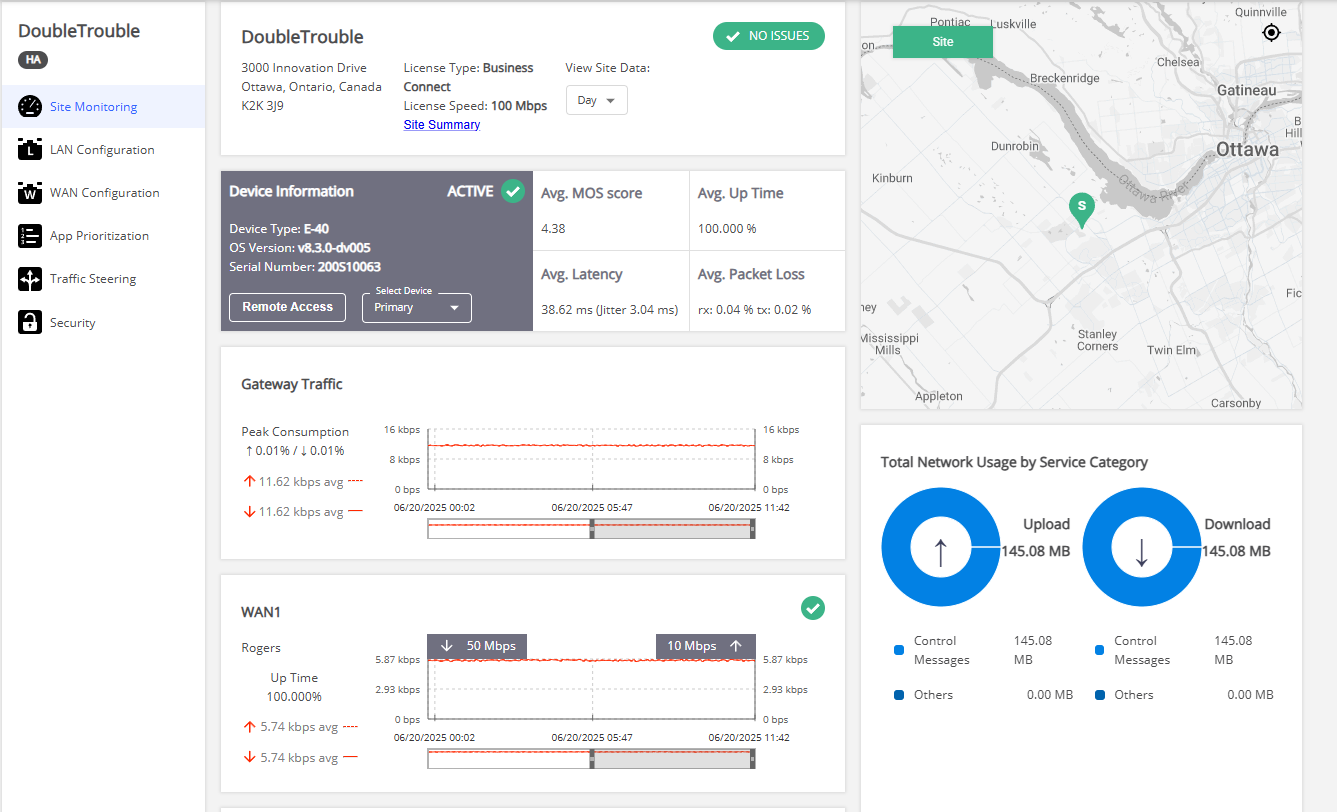
The Link Severity and Site Severity table show how the severity is determined.
Link severity
|
Condition
|
Severity
|
Color
|
Representation
|
|---|---|---|---|
|
Link is online and has a MOS score is 4.0 and above
|
No issues
|
Green
|

|
|
Link is online and has a MOS score lower than 4.0
|
Low
|
Yellow
|

|
|
Link is configured but not connected
|
High | Red |

|
|
Link is not configured
|
Not applicable
|
No color
|
|
Site severity
|
Condition
|
Severity
|
Color
|
Representation
|
|---|---|---|---|
|
All WAN links and wireless connection at site are up and running without issues.
|
No issues
|
Green
|
|
|
Site has one or more links with low severity, but at least one link is up with no issues.
|
Low
|
Yellow
|
|
|
Site has one or more links with a high severity but at least one link is up.
|
Medium
|
Orange
|

|
|
Site has all configured links with high severity. Note that in this scenario, the device is unreachable and considered to be offline.
|
High | Red |
|
Note: When the All Breakout template is used for Business Connect sites, the gateway is unable to communicate with these sites. As a result, the site dashboard for these sites does not display any statistics and the site status is displayed as High. See Traffic Steering for details.
Site Severity for High Availability Sites
High Availability (HA) sites include two devices—a primary and a secondary. In an HA setup, only one device is active at a time, while the other remains inactive. However, the system continuously monitors the links on both devices, regardless of their active or inactive status. The service severity for each device is determined by the condition of its links, and the overall site severity is then calculated based on the severities of both devices.
|
Condition
|
Device Severity
|
Site Severity
|
|---|---|---|
|
|
|
|
|
|
|
|
|
|
|
|
|
|
|
|
|
|
|
|
|
|
|
|
|
|
|
|
|
|
|
|
|
Customer Dashboard
The customer dashboard shows service severity of a customer network. The Customer service severity is determined by the highest severity of the different sites configured for the customer. The service severity is displayed on both Customers table and the customer dashboard. In the Customers Table, the Service Severity column indicates the severity of the network.
Customers table – service severity
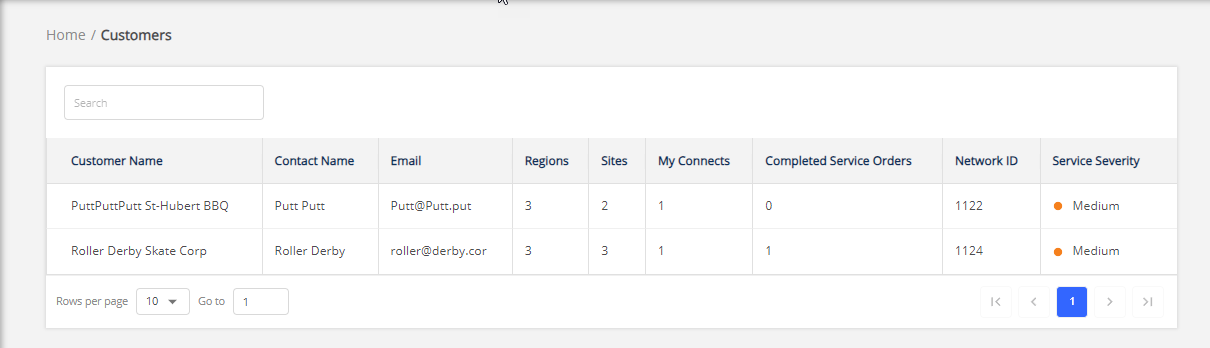
In the customer dashboard, the customer network service severity is denoted in the upper right corner of the customer information section. It is derived by combining the severity of individual sites within the networks as described in table Customer dashboard severity. The severity of individual sites is listed in the site table. In the example shown here, the severity of the customer network is denoted as low because two sites listed in the site table have service severity as low.
Customer dashboard – service severity
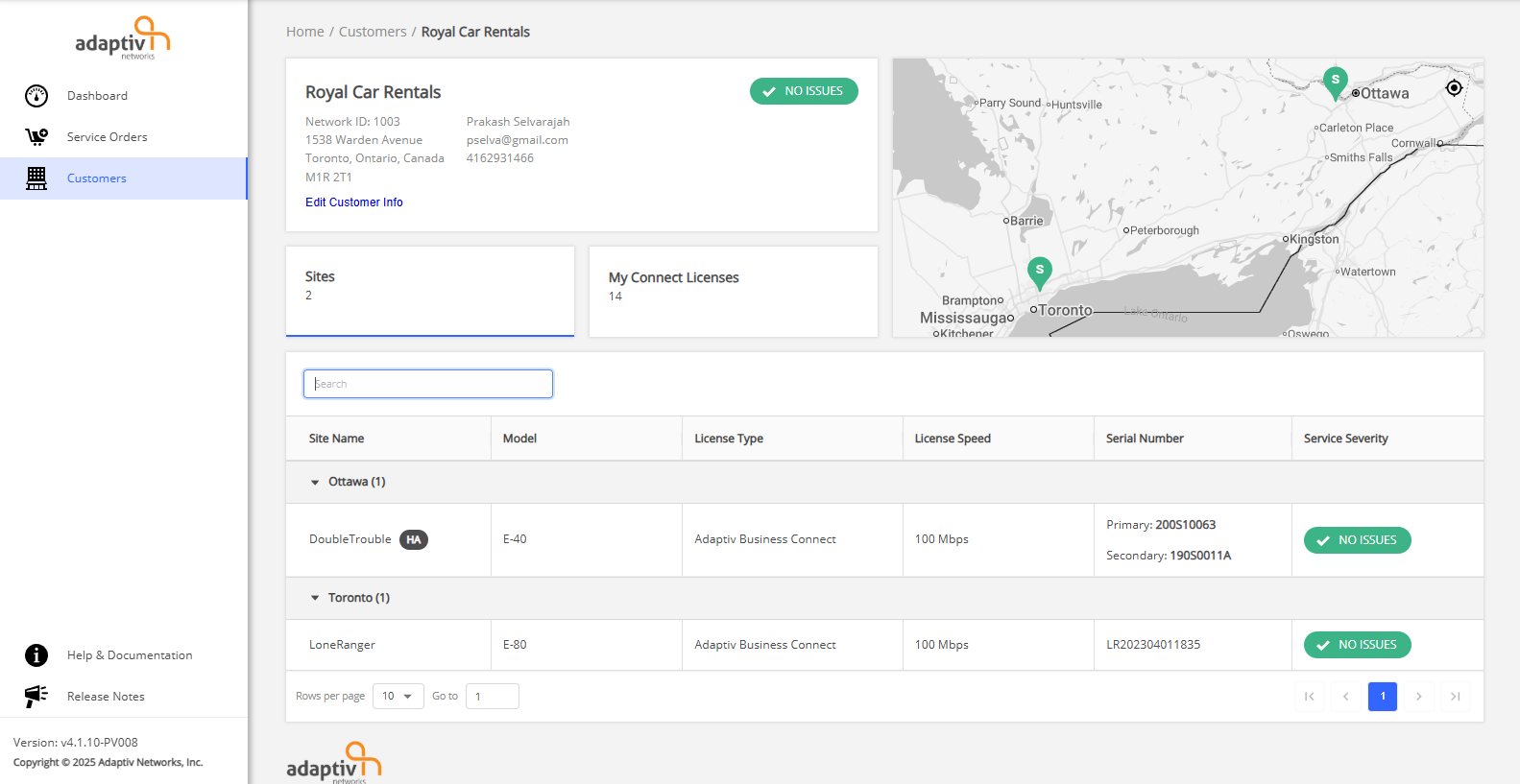
The customer dashboard severity table shows how service severity is determined for customer dashboard.
Customer dashboard severity
|
Condition
|
Severity
|
Color
|
Representation
|
|---|---|---|---|
|
All sites have no issues.
|
No issues
|
Green
|
|
|
At least one site has low service severity.
|
Low
|
Yellow
|
|
|
At least one site has medium service severity.
|
Medium
|
Orange
|
|
| At least one is has high service severity. | High | Red |
|
Partner Dashboard
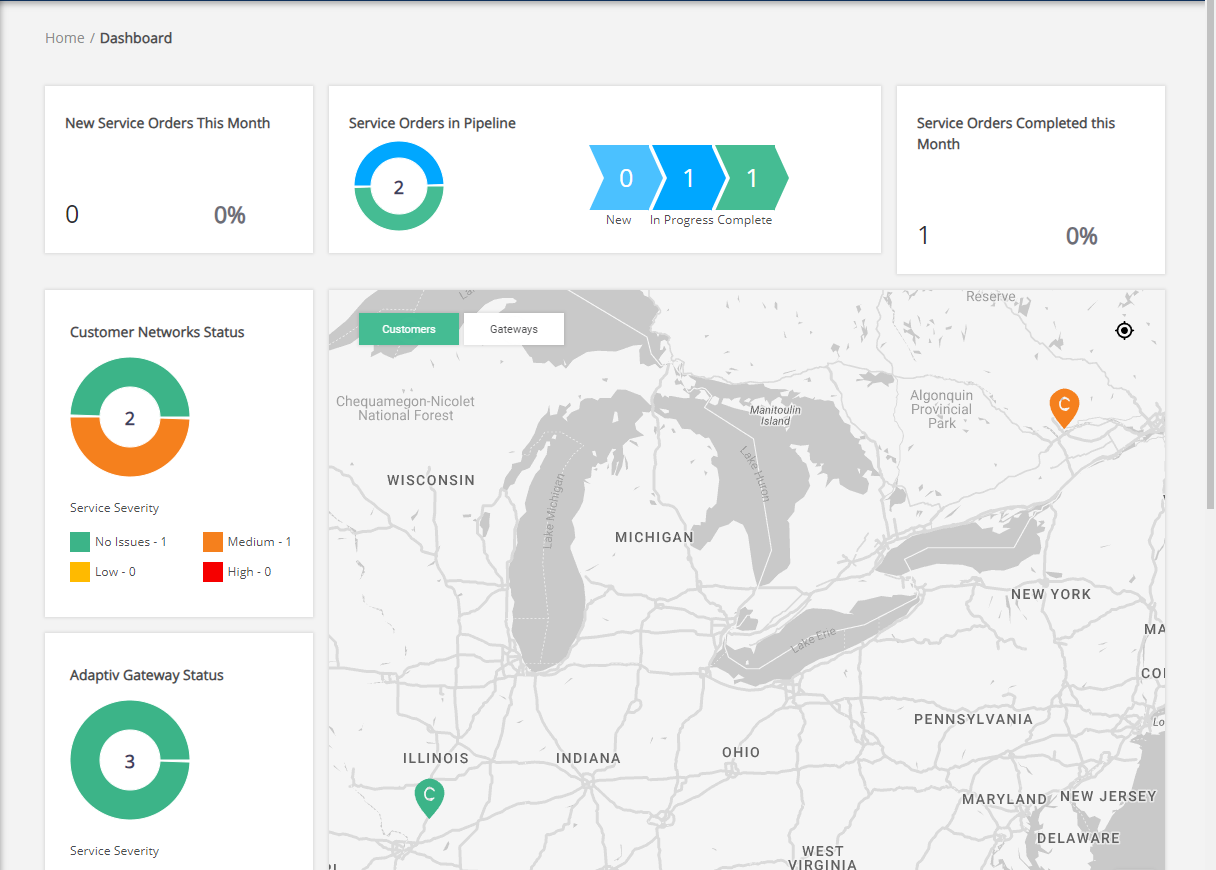
In the partner dashboard, the service severity of different customers belonging to a partner is displayed in form of a donut chart. The donut chart is located under Customer Network Status section. The total number of customer networks are shown in the center of the donut chart. The chart shows percent distribution of severity across all customer networks. The Customer Network Status also shows the number of customers for each service severity. The customer severity is also represented on the map by displaying the customer pin color associated with the service severity of that customer.
In the example here, there is one customer network with no issues and one customer network with medium service severity.
Partner dashboard – service severity
Partner dashboard severity
The partner dashboard severity table shows how service severity is determined for partner dashboard.
|
Condition
|
Severity
|
Color
|
Representation
|
|---|---|---|---|
|
All customer networks have no issues
|
No issues
|
Green
|
|
|
A customer network has site(s) with low severity.
|
Low
|
Yellow
|
|
|
A customer network has site(s) with medium severity.
|
Medium
|
Orange
|
|
|
A customer network has site(s) with high severity.
|
High | Red |
|
TERMS OF USE | PRIVACY POLICY | USER LICENSE AGREEMENT