Partner Dashboard
Upon logging into the orchestrator, a partner is automatically routed to the partner dashboard. The dashboard is organized into multiple components to provide information about service orders as well as customer network and Adaptiv gateway status. By selecting (or clicking) the customer location pin on the interactive site map, partners can access the customer dashboard.
Partner Dashboard
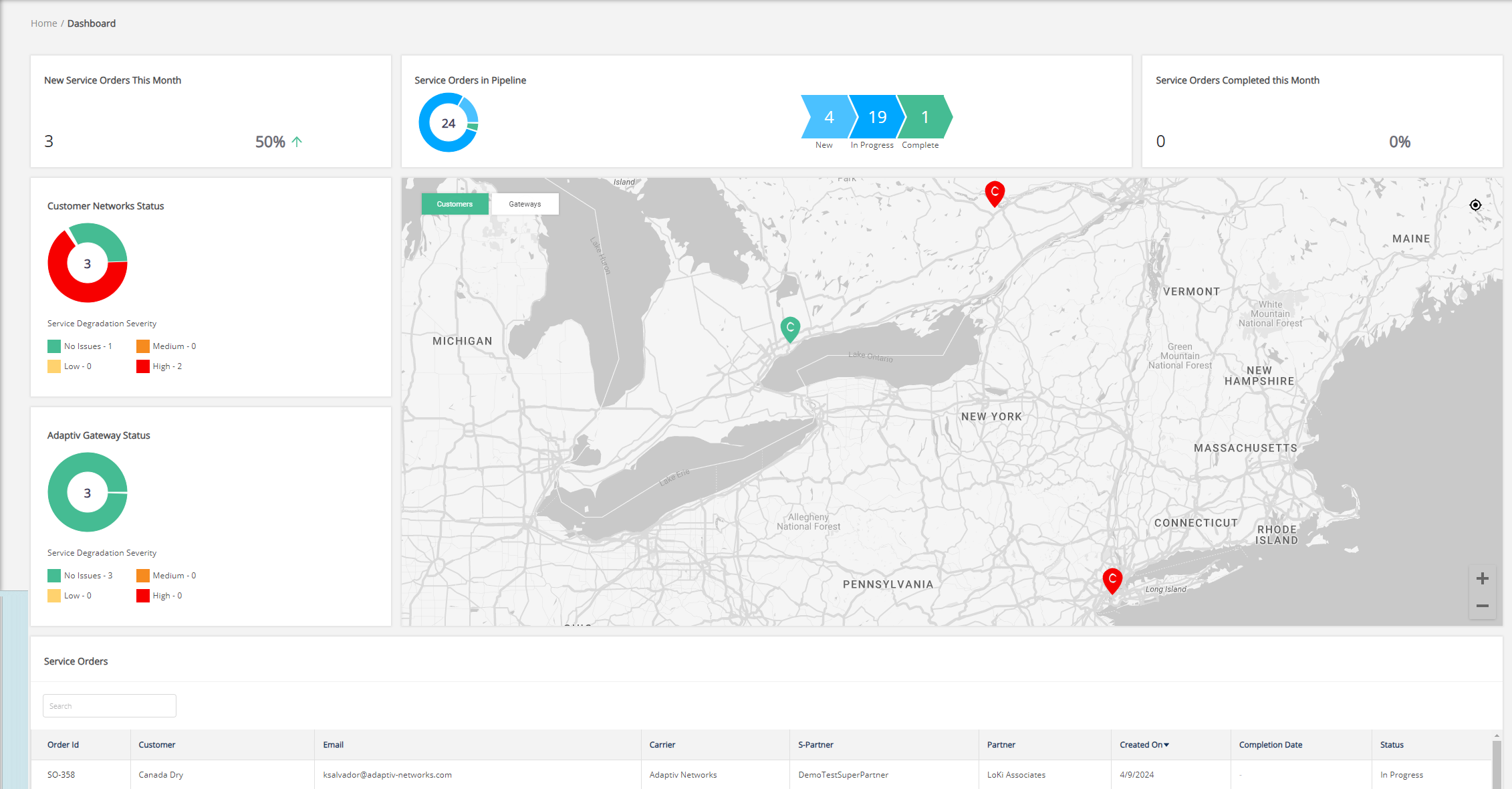
The following information is available in the partner dashboard.
- New Service Orders This Month – Number of service orders created in the calendar month.
- Service Orders in Pipeline – Distribution chart showing the service orders in new, in progress, and complete statuses. Clicking a status value from this chart will pre-filter orders for that status in the Service Orders table at the bottom of the page.
- Service Orders Completed This Month – Number of service orders completed in the calendar month.
- Customer Network Status – Shows the status of customer network(s). The status of the customer network is relative to the status of sites within the network. For details, see Service Severity.
- Adaptiv Gateway Status – Shows the status of Adaptiv gateways.
- Service Orders table – The table displays a list of service orders for all customers.
TERMS OF USE | PRIVACY POLICY | USER LICENSE AGREEMENT
Copyright © 2026 Adaptiv Networks, Inc. Send Feedback