Product Installation
The Installation section defines the installation workflow and outlines the procedures to activate services on Adaptiv | Edge.
Overview
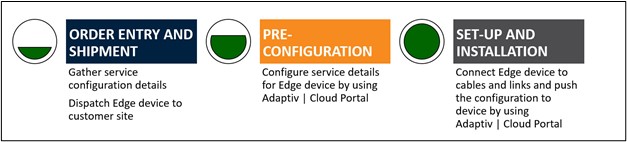
Step I – Capture provisioning details in order entry
The partners collaborate with customers to find out the provisioning requirements and submit an order. To learn more about the process, click here.
Step 2 – Ship Edge device to the customer
Depending on order fulfillment requirements, the following shipment options are available.
- Adaptiv Networks ships the order to the partner and the partner delivers this to the customer site
- Partner builds an inventory of Adaptiv | Edge devices and fulfills the order by shipping to the customer site
- Adaptiv Network ships the order directly to the customer site
Step 3 – Provision Adaptiv | Edge device
After dispatching the Edge device to a customer, the partner users can log in to the Adaptiv | Cloud Portal and begin with the provisioning process.
Step 4 – Set up the Edge device and underlay links at the customer site
A network technician or staff at the customer site connects the Edge device to the network cables, modem, and underlay links. This set-up does not require a login to the Adaptiv | Cloud Portal.
Step 5 – Install with Adaptiv | Cloud Portal
Once the underlay links have been physically tested and connected, the Edge device can communicate with the Adaptiv | Cloud Portal. The partner users can log in to the Portal to manage the unit
Related topics
Provisioning | Installation Best Practices | Saving Device Configuration
TERMS OF USE | ANTI SPAM | PRIVACY POLICY | USER LICENSE AGREEMENT | PATENTS