View Logs
You can view logs about the My Connect service running on their devices. The logs provide general information about software behavior, errors encountered, and warning messages, if any.
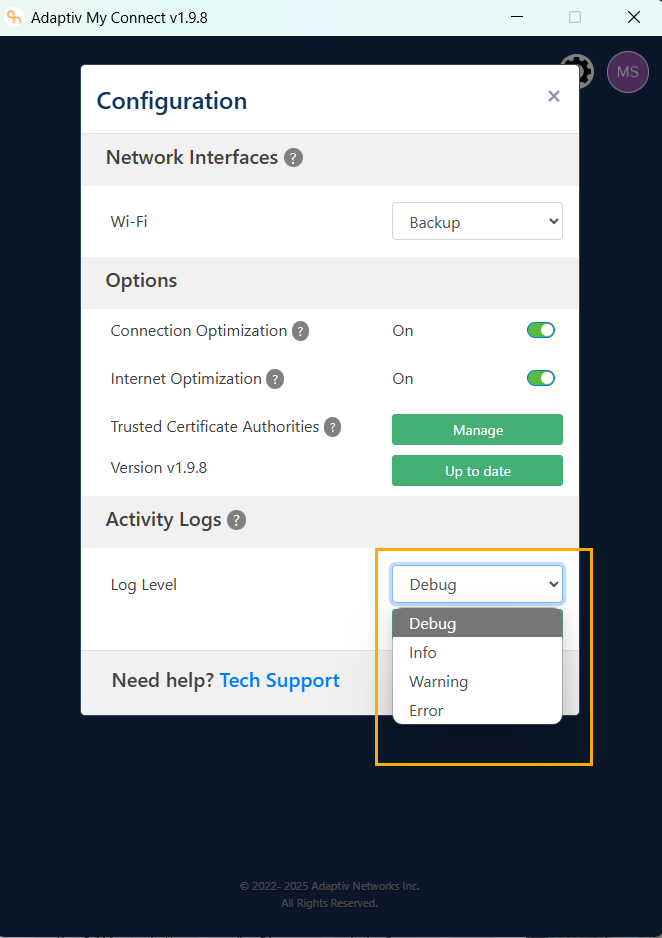
To view the logs
In the Activity Logs section of Configuration panel, select the Log Level.
The following logs are available:
- Debug – These are the most detailed logs, meant for developers when debugging an application. They contain information relevant only during development, such as variable values, function calls, or system states.
- Info – These logs provide general information about normal operations of the application. They can be used to track high-level events, like when a user logs in, or a process starts and ends.
- Warning – Warnings indicate something unexpected or potentially problematic happened, but it is not severe enough to cause the application to fail. For example, a warning could signal that a configuration file is missing but the system is using default settings instead.
- Error – Errors signify more serious issues that have caused a failure in part of the application. These logs usually demand immediate attention, as they often affect functionality – like a failed database connection or an unhandled exception.
TERMS OF USE | ANTI SPAM | PRIVACY POLICY | USER LICENSE AGREEMENT | PATENTS
Copyright © 2025 Adaptiv Networks, Inc. Send Feedback