Optimize Network Connections
The Configuration panel provides two options to optimize network connections – Connection Optimization and Internet Optimization. Both options help to optimize the performance of network connection. By default, both options are enabled.
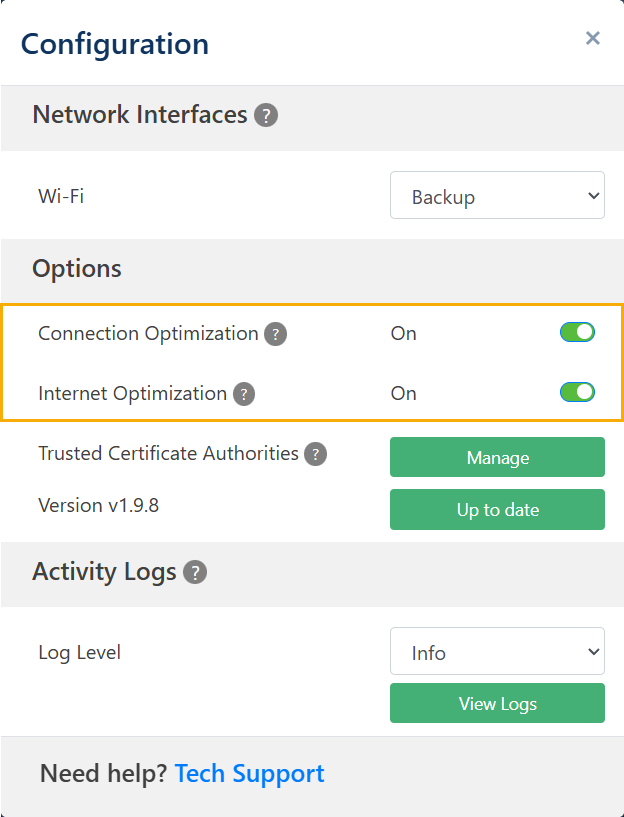
Connection Optimization
The Connection Optimization option optimizes your network connection and protects against network loss due to increased data consumption. When enabled, it injects FEC (Forward Error Correction) packets into the data stream. These packets help recover data lost due to congestion or random network bit errors (i.e., consumption). Adaptiv recommends to keep the configuration enabled to maximize its benefits.
On crowded networks, interference and congestion can cause errors in data transmission. Since FEC allows the receiver to correct errors without needing retransmissions, it helps maintain a stable connection, reducing lag and buffering. This could be particularly useful in work from home scenarios, where video conferencing may be competing against video streaming or online gaming; or in a crowded coffee shop where dozens other devices are connected to the same Wi-Fi.
Internet Optimization
The Internet Optimization feature improves the resiliency of the network. It works in combination with the Connection Optimization feature and prevents call drops and loss of virtual meetings when paired with multiple Internet links. When disabled, all internet traffic breaks out locally instead of going through the encrypted SD-WAN tunnel. When enabled, all the traffic is routed through the tunnel. Adaptiv recommends to keep the configuration enabled to maximize its benefits.
TERMS OF USE | ANTI SPAM | PRIVACY POLICY | USER LICENSE AGREEMENT | PATENTS