Back up using the Management Interface
Follow this procedure to back up each module in your device using the Management Interface. You can access the management interface through SSH on port 22 or through the web interface on port 80.
- Connect the management interface to your computer.
- Open your web browser and navigate to the unit's IP address.
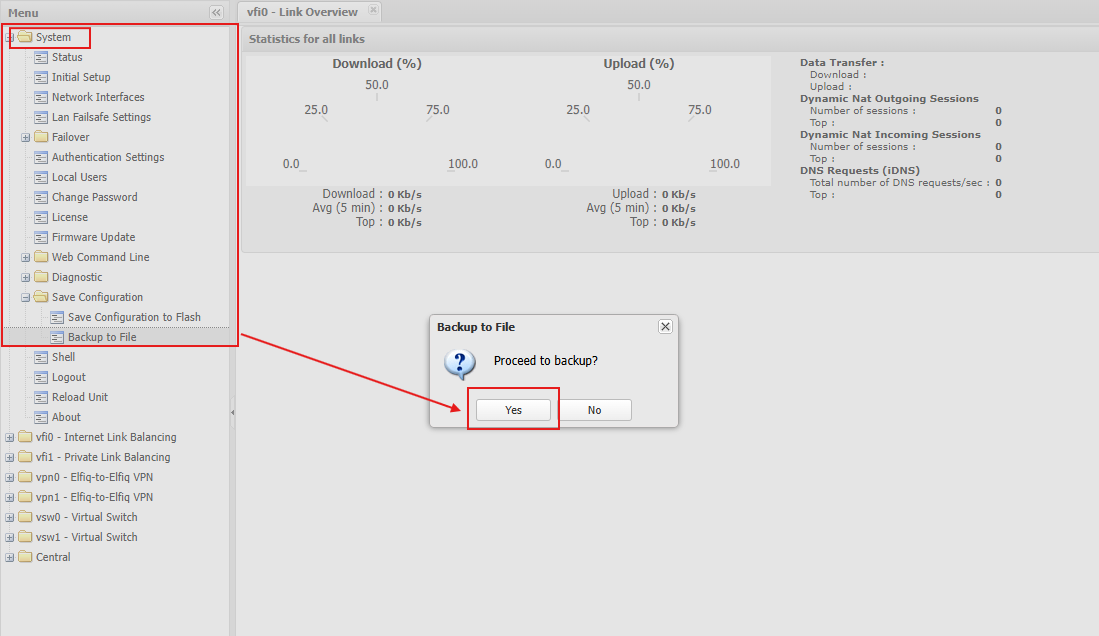
- From the main menu, open the System folder.
- Open the Save Configuration folder.
- Select the Backup to File.
- Click Yes to save the file → A Configuration.txt file will automatically be downloaded.
TERMS OF USE | ANTI SPAM | PRIVACY POLICY | USER LICENSE AGREEMENT | PATENTS
Copyright © 2026 Adaptiv Networks, Inc. Send Feedback