Routable Subnets
A Routable Subnet is a feature that allows the CPE to forward traffic to subnets located behind another router, even if those subnets are not directly connected to the CPE. This is useful when additional networks exist beyond the immediate SD-WAN site, as it enables routing to those remote subnets without requiring direct attachment to the Ed.

|
Routable Subnets can be configured through the LAN Configuration page. For detailed instructions on configuring and managing routable subnets, see this article. |
Why use Routable Subnets?
A device on the LAN (192.168.30.50) wants to reach the IP address 192.168.5.20.
- Device 192.168.30.50 belongs to 192.168.30.0/24
- Device 192.168.5.20 belongs to 192.168.5.20/24
Since they are different subnets → They do not know how to reach each other directly. Devices only know how to reach others within their own subnet. Instead, they require a Router to communicate directly with each other. With Routable Subnets configured, the traffic goes through:
| Device (192.168.30.50) → Edge → Next-hop Router (192.168.30.100) → Destination Subnet ( 192.168.5.0/24 ) |
|---|
To have a better understanding of how the traffic goes through, see How Routable Subnets work below.
How Routable Subnets Work
Routable Subnet Configuration
- Routable Subnet - The IP address and prefix length of the network to be reached via the LAN interface of the Edge device.
It must be defined under CIDR (Classless Inter-Domain Routing) format: <IP_ADDRESS>/<PREFIX_LENGTH>(e.g.,192.168.5.0/24) - Next Hop IP - The IP address of the router that will forward traffic to the routable subnets.
For more details on Routable Subnets Configuration, see To configure and manage routable subnets in Adaptiv Cloud Orchestrator.
How the traffic flows
When the routable subnet and next hop IP are configured, the Edge device knows which subnet can be reached and which router (next hop IP) to forward the traffic to. The traffic flow works as:
- Check routing table: The device checks its routing table to find the subnet match.
- Forward to next hop: The device forwards the traffic to the configured Next Hop IP.
- Router delivery: The router sends the traffic to the destination subnet.
Example
A device on the LAN (192.168.30.50) wants to reach the IP address 192.168.5.20
Configuration:
- Subnet = 192.168.5.0/24
- Next Hop IP = 192.168.30.100
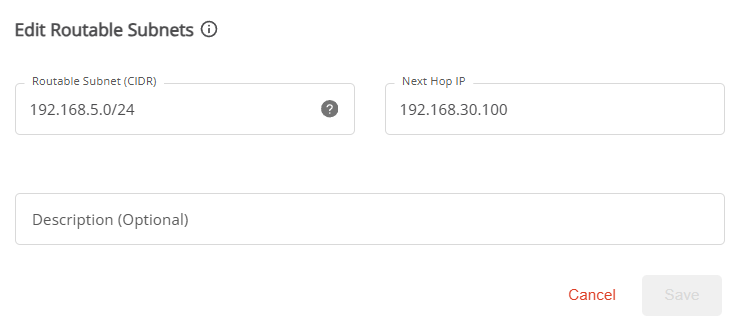
The traffic flow:
- Check routing table: The device checks the routing table for the destination IP (192.168.5.20)
Since 192.168.5.20 is inside the configured subnet 192.168.5.0/24 → Match. - Forward to next hop: The Edge forwards traffic to the next Hop IP 192.168.30.100
- Router delivery: The next-hop router receives the traffic and then delivers it to the 192.168.5.0/24 subnet
For practical examples of how Routable Subnets is a beneficial feature for businesses, you can click on the link: Routable Subnets Business Use Cases
TERMS OF USE | ANTI SPAM | PRIVACY POLICY | USER LICENSE AGREEMENT | PATENTS