KVM virtual machine deployment workflow
This document outlines the end-to-end KVM virtual machine (VM) deployment process, from gold image creation in the lab, through validation in QA, to production deployment at the stores.
Environments and their roles
The workflow spans three environments. Each one runs a DataSync Docker container, and the container's environment variables determine which part of the cloud storage bucket that environment syncs with and in which direction.
The following diagram shows the three environments, their DataSync settings, and how a new image moves from the Gold Image Lab to the QA Lab and then to the stores.
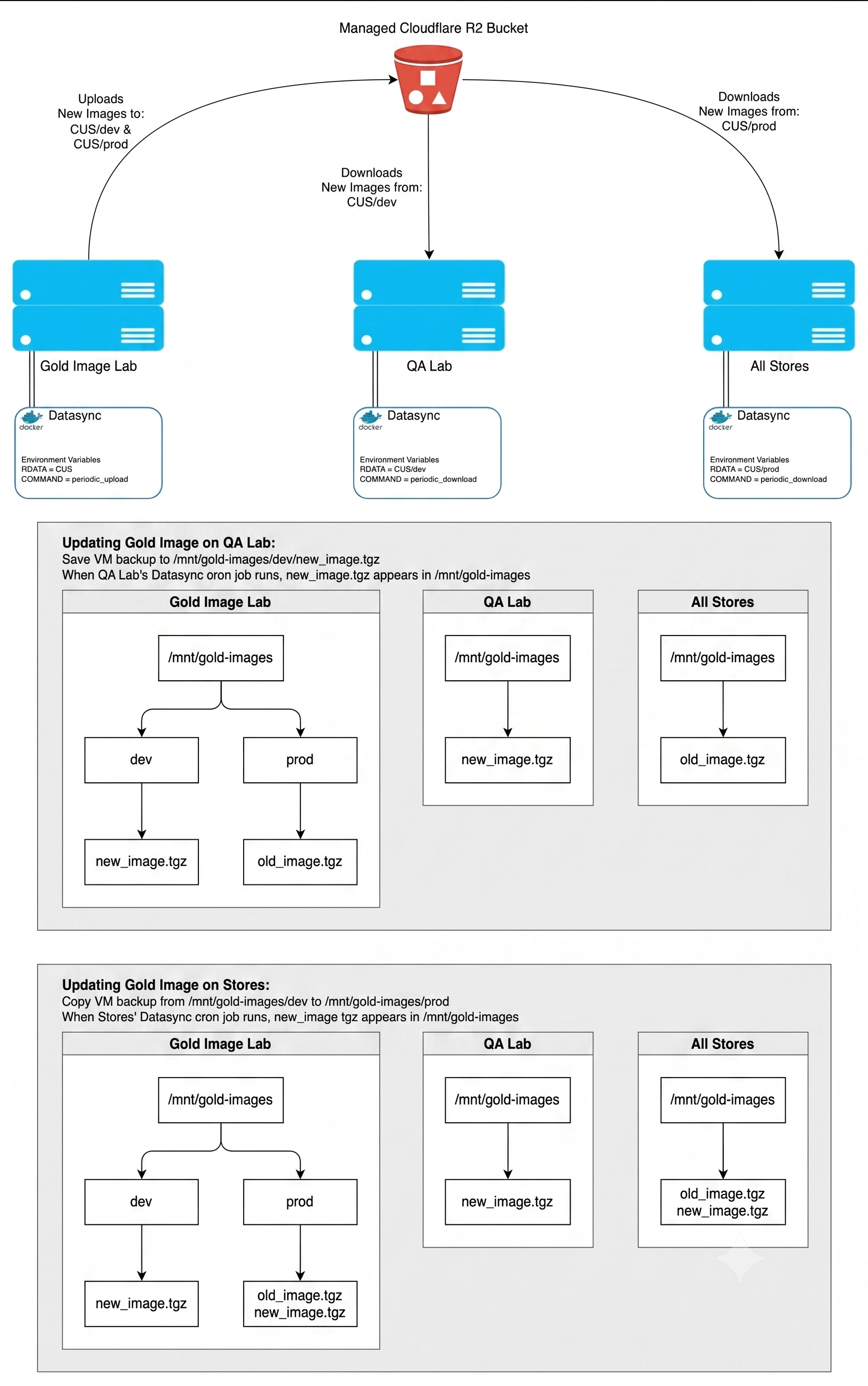
| Environment | RDATA | COMMAND | Role |
|---|---|---|---|
| Gold Image Lab | CUS | periodic_upload | Where gold images are created. Uploads new images to the cloud. |
| QA Lab | CUS/dev | periodic_download | Downloads the latest gold images from CUS/dev for validation. |
| All Stores | CUS/prod | periodic_download | Downloads the latest approved gold images from CUS/prod. |
Gold images are stored in a Scale Computing managed Cloudflare R2 bucket. The bucket is divided into two prefixes:
CUS/devholds candidate images that are under test.CUS/prodholds approved images that are released to the stores.
Because the Gold Image Lab is configured with RDATA=CUS, it syncs the entire prefix and therefore feeds both channels from a single host. The QA Lab and the stores are each scoped to a single prefix, so an image cannot reach the stores until it has been explicitly promoted.
On every environment, gold images live under /mnt/gold-images. On the Gold Image Lab this directory contains dev/ and prod/ subdirectories that map to the two bucket prefixes. On the QA Lab and the stores, /mnt/gold-images is flat and contains only the images downloaded for that environment.
DataSync runs on a cron schedule rather than continuously, so images do not appear on the downstream environments the moment they are written. Expect a delay of up to one cron interval.
Phase 1: Creating the gold image
The process begins in the Gold Image Lab, where a VM is configured to serve as a gold image. This VM acts as a base template, including a standard operating system, a core set of applications, and security configurations.
Once the VM is prepared, use the SC//Reliant Virtual Controller (RVC) kvm.full_backup method to capture a complete disk image of it, writing the backup to /mnt/gold-images/dev/:
rvc kvm full-backup --hostname <kvm_hostname> --filename /mnt/gold-images/dev/<new_image>.tgz --optimize --compressFor more information on creating full backups, see Backing up and restoring your virtual machines.
Phase 2: Validating the gold image in QA
When the Gold Image Lab's DataSync cron job next runs, it uploads the new image from /mnt/gold-images/dev/ to the CUS/dev prefix of the bucket. When the QA Lab's DataSync cron job runs, the image is downloaded and appears in /mnt/gold-images on the QA Lab host.
Validate the image in the QA Lab before promoting it. Until the image is promoted, the stores continue to run the previously approved image and are unaffected.
Phase 3: Promoting the gold image to production
Promotion is a deliberate, manual step and is the release gate for the stores. On the Gold Image Lab, copy the validated image from the dev/ subdirectory to the prod/ subdirectory:
cp /mnt/gold-images/dev/<new_image>.tgz /mnt/gold-images/prod/The Gold Image Lab's next DataSync run uploads the image to the CUS/prod prefix. Each store's next DataSync run then downloads it into /mnt/gold-images on that store's host, alongside any previously downloaded images.
Existing images are not removed when a new one arrives, so /mnt/gold-images accumulates images over time on every environment. Review the directory periodically and remove images that are no longer needed. Deployments select an image explicitly by filename, so an older image remaining on disk does not affect which image a new VM receives.
For more information on how the sync is configured, see the gold image synchronization section of Configuring your KVM virtual machines.
Phase 4: Deploying the VM shell
To provision a VM on a target host, a new VM is added to a node group. A node group is a configuration bundle that defines the resources and properties of a set of hosts.
When a VM is added to a node group, this action provisions a minimal KVM VM configuration on the target host. This configuration reserves the necessary compute, memory, and storage resources without deploying the gold image data. This VM shell is then deployed and configured on the hosts via Puppet.
You define the VM's resources in SC//Reliant Platform Manager using one of two hashes, depending on whether the VM runs inside or outside a cluster:
- KVM Resources for singleton VMs, which run as stand-alone virtual nodes on a single edge security device with no clustering.
- Cluster KVM Resources for highly available VMs, which are monitored and fail over to backup virtual nodes when an issue occurs. In addition to the standard resource properties, these VMs also require Distributed Replicated Block Device (DRBD) settings, which mirror the storage data between the physical hosts.
At a minimum, the shell needs the compute, memory, and storage properties that reserve resources on the host, the network and graphics properties that make the VM reachable, and, for clustered VMs, the DRBD and identity properties. Set Auto Boot according to where the VM runs: disable it inside a cluster so the platform manages starting and stopping the VM, and enable it outside a cluster.
Resource property values can be set at either the node or the node group level, and a value set on the node takes priority over the same value on the node group. Each value can be a raw value or a property reference. Use a property reference for values best defined per node, such as network interface details, and a raw value otherwise.
For the full property reference, including which properties are required in each hash and their default values, see Configuring your KVM virtual machines.
Phase 5: Restoring the gold image
With the VM shell provisioned, the Virtual Machine Restore command is executed. This command initiates a data transfer from the gold image in /mnt/gold-images on the target node to the empty VM shell.
Once the image data is fully restored, the VM can be powered on. This completes the VM deployment, resulting in a fully operational VM with the exact configuration of the gold image.
Summary
This process ensures a standardized and scalable VM deployment. Gold image creation, QA validation, and production release are separated by the dev and prod prefixes in cloud storage, so no image reaches a store until it has been explicitly promoted. Separating image creation from automated deployment maintains consistency and operational efficiency across the entire VM infrastructure.