Viewing vulnerability scan results
Within the Internal Vulnerability Scans application in AcuVigil, you can view the vulnerability scan results. The scan results display the following reporting and remediation guidance.
- PCI compliance summary: Highlights non-compliant areas and required corrective actions.
- Comprehensive reports: Includes risk categorization (low, medium, high, critical), CVSS scores, and affected hosts.
- Actionable fixes: Provides remediation steps based on OpenVAS findings (patch updates, configuration hardening).
View the vulnerability scan results in AcuVigil
- Access the AcuVigil dashboard.
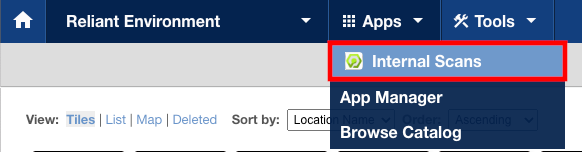
In the Apps menu, choose Internal Scans.
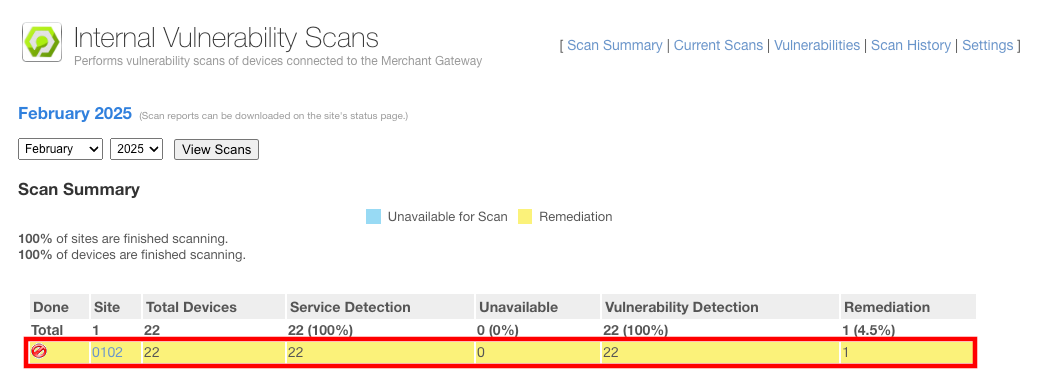
From the Internal Vulnerability Scans application view, you can see each device that has the Internal Scans application installed. Select the link for the Site for which you want to view the scan data.
From the list of scan data for each device, you can use the drop down menus for the month and year to change the scope of the scan results for the site.
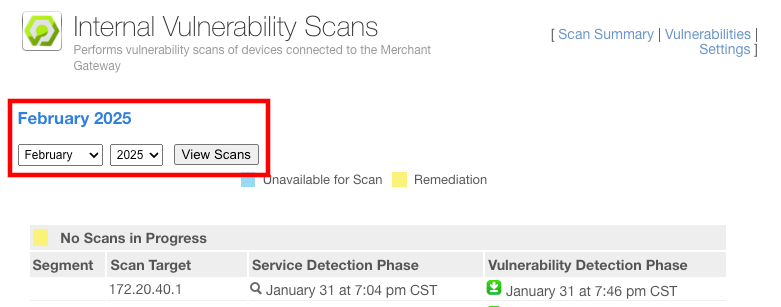
From the list of scan results, there is a download link for the vulnerability report for each scan target.
