Breakout at the Edge is an SD-WAN feature that routes internet-bound traffic to exit directly from a branch office or remote site to the internet, instead of backhauling through a central gateway or data center. This can be useful to avoid double-tunnelling, or for traffic that does not require reliable or stable network connectivity.
How Breakout at the Edge works
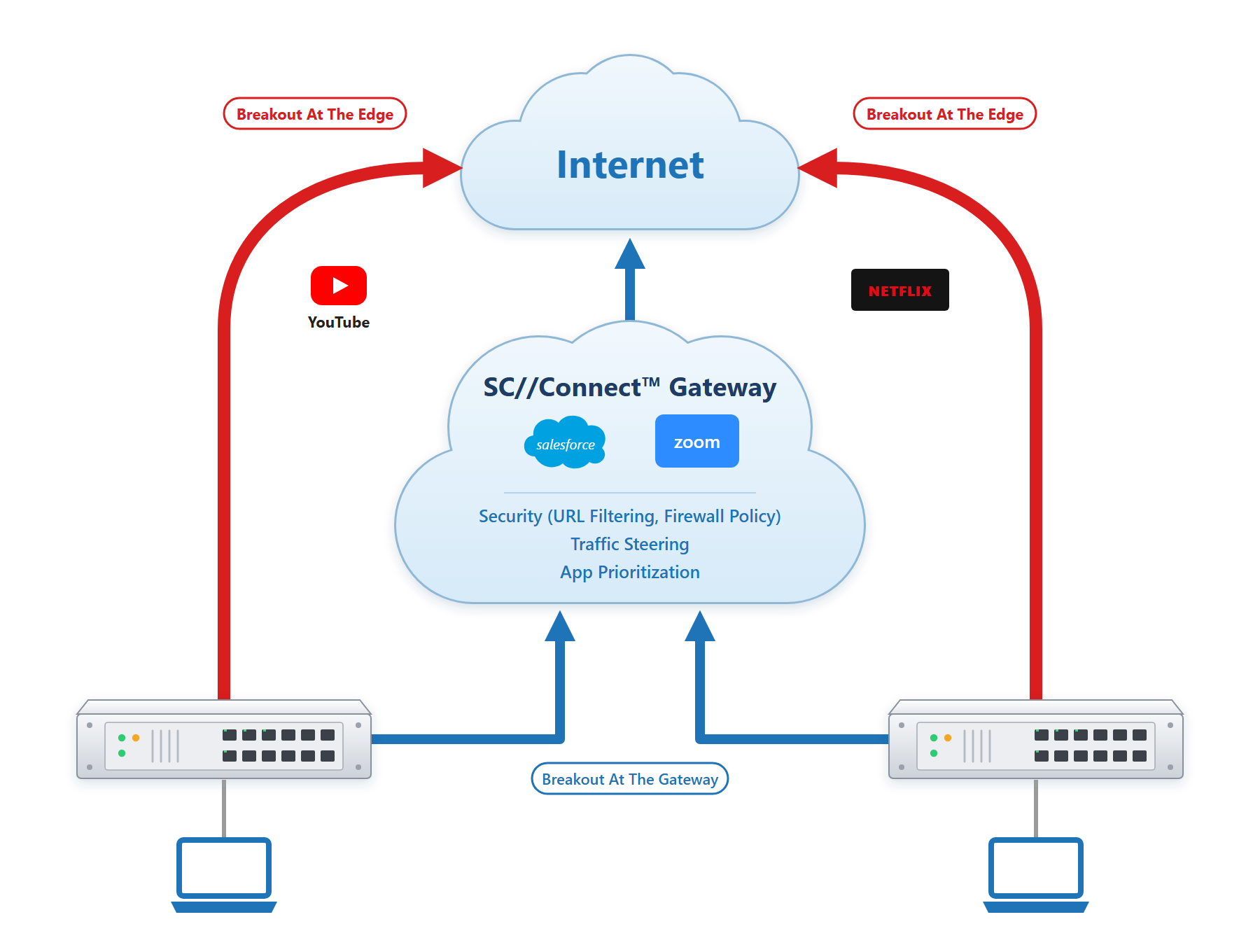
Traffic is classified according to user-defined policies, based on the user’s choice for critical or non-critical purposes:
- Critical Traffic — High-priority applications that are essential to business operations and require low latency, high reliability, and consistent security.
Example: Microsoft 365, Zoom, or Salesforce.
Recommendation: Route via Breakout at Gateway for centralized security, monitoring, and compliance. - Non-Critical Traffic — Lower-priority applications that are less sensitive to latency and do not require strict performance guarantees.
Examples: Social networks, Streaming (Netflix), Video Gaming.
Recommendation: Route non-critical traffic through Breakout at the Edge to improve user experience and reduce load on centralized gateways.
Traffic using local breakout during failover bypasses the SD-WAN overlay and SC//Connect™ Network. As a result, while this traffic is sent out directly to the Internet, it can no longer benefit from reliability features (e.g. seamless failover), quality features (e.g. bi-directional QoS), security features (e.g. web filtering, encryption, malware detection), etc.
Breakout at the edge should only be used in very specific cases, such as avoiding double encryption (or double tunnelling), or for non-critical and low-priority traffic already encrypted.
For security reasons, unknown traffic can not be broken out at the edge. In the case of Network Protect, breakout at the edge is disabled for security reasons.
Breakout at the Edge During Failover
In deployments with multiple WAN connections, Breakout at the Edge can also serve as a failover mechanism. When the preferred WAN link becomes unavailable, configured traffic can continue to access the Internet through an alternate local WAN connection.
SC//Connect™ evaluates available WAN links and selects the best path according to the configured steering algorithm. Currently, we support the following steering algorithms:
- OPFA (Order Preferred First Algorithm) – Active–Passive configuration (recommended)
- ETFA (Equalized Traffic First Algorithm) – Active–Active configuration
For more information, see Steering Algorithms.
Recommendation:
When using Breakout at the Edge for specific applications, OPFA is generally recommended because it helps maintain source IP consistency by preferring a single WAN link. In contrast, ETFA may distribute traffic across multiple active links, potentially causing source IP changes that can disrupt applications relying on IP-based sessions.
For practical examples of how Breakout at the Edge is a beneficial feature for businesses, you can click on the link: Breakout at the Edge Business Use Cases