The SG2v1 edge security device (ESD) monitors door contacts and temperature probes through a sensor dongle that plugs into the SENSOR BUS connector on the I/O panel. The dongle breaks the connector out to a six-position screw terminal block: one pair for the 1-Wire temperature bus, and two pairs for door contacts.
Readings from these sensors appear in SC//AcuVigil™ — door state in the Door Monitoring application, and temperature alongside the other site telemetry.
Dongle pinout
The following shows the terminal block, viewed with the dongle's connector facing away from you. The positions are numbered left to right.
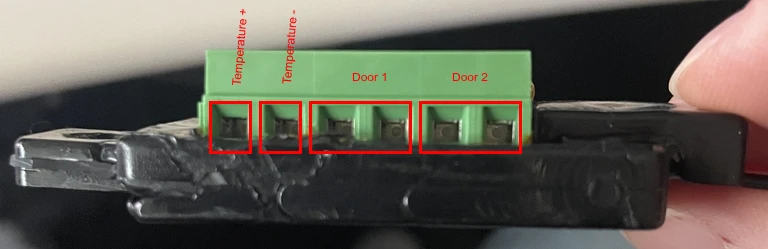
| Position | Marking | Connect |
|---|---|---|
| 1 | Temperature + | 1-Wire data/power lead, all temperature probes |
| 2 | Temperature − | 1-Wire ground lead, all temperature probes |
| 3–4 | Door 1 | First door contact, either polarity |
| 5–6 | Door 2 | Second door contact, either polarity |
Note the following before you wire the dongle:
- The temperature pair is a bus, not a single-sensor input. Every temperature probe on the device lands on positions 1 and 2, however many you install. See Wiring multiple temperature sensors.
- Each door input is an independent dry contact pair. Door 1 and Door 2 are separate circuits and don't share a common.
Warning: Wire the dongle with the SG2v1 unplugged, and observe the temperature polarity. Reversing Temperature + and Temperature − will prevent the probes from being detected. |
Wiring door sensors
Each door contact is a simple open/closed switch across its two terminal positions. Polarity doesn't matter.
- Unplug the SG2v1.
- Land the two leads from the first door contact on positions 3 and 4.
- Land the two leads from the second door contact, if you have one, on positions 5 and 6.
- Seat the leads fully and tighten the screw terminals.
- Plug the dongle into the SENSOR BUS connector, then power the SG2v1 back on.
Route the low-voltage leads away from AC power runs and motors, secure them with cable ties, and label both endpoints so a later technician can tell Door 1 from Door 2 without tracing the wire.
Wiring temperature sensors
Temperature probes use the Dallas 1-Wire protocol. It is a low-speed two-wire bus, which is what lets a single pair of terminals carry several probes over long distances — but it is also sensitive to how that wiring is laid out.
A single sensor
Land the probe's two leads on positions 1 and 2, observing polarity. No other wiring is required.
Wiring multiple temperature sensors
When you install more than one probe, run one common pair from the dongle and stub each probe off that pair at its own point along the run. This is the topology to use, and it matters most on long runs.
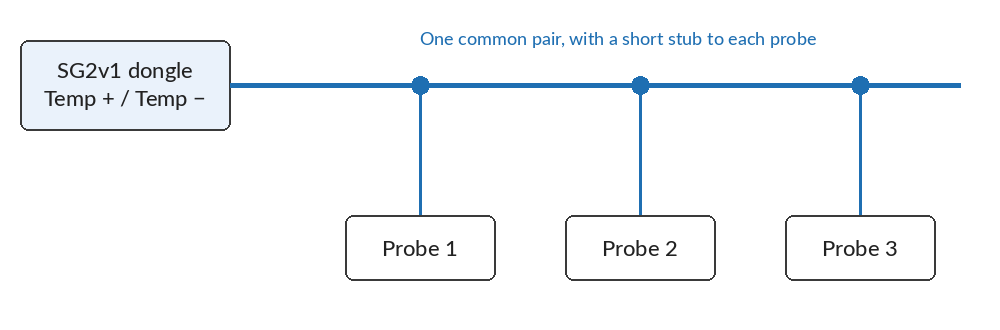
The horizontal run is the common pair. Each probe hangs off it on a short stub.
Do not run a separate home-run pair from the dongle to each probe. That star topology may work over short distances, but on longer runs it causes reflections and errors on the 1-Wire bus.
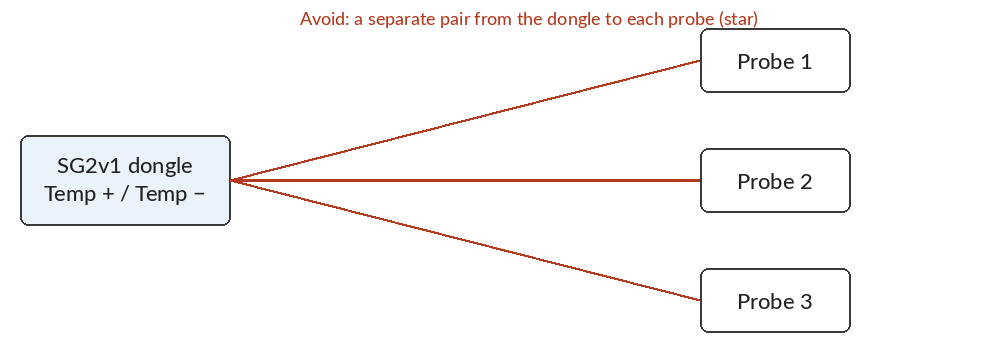
For the underlying guidance on long 1-Wire runs, see Guidelines for Reliable Long Line 1-Wire Networks from Analog Devices.
Troubleshooting
A probe reports 85 °C / 185 °F. This is the 1-Wire sensor's power-on reset value, not a real reading — the probe reset itself mid-conversation instead of reporting a temperature. It usually points to signal timing trouble on the bus, and it becomes more likely as probes are added. Check the bus topology first: rewire any star runs onto a single common pair with stubs, as described above. If the readings persist on correctly wired runs, contact Scale Computing Support: open a ticket in the SC//AcuVigil dashboard, email team@scalecomputing.com, or call (512) 687-7401.
A probe is not detected at all. Confirm the leads are on positions 1 and 2 with the correct polarity, that the screw terminals are tight on stripped conductor rather than insulation, and that the dongle is fully seated in the SENSOR BUS connector.
A door shows the wrong state. Door inputs have no polarity, so a reversed pair is not the cause. Verify the contact is wired to the pair you expect — a swapped Door 1 and Door 2 is the common case — and that the contact itself closes when the door closes.